USE ESP32 to publish MQTT message (PubSubClient.h 與Arduino線上不同)
https://osoyoo.com/2020/07/20/use-osoyoo-esp8266-wifi-shield-to-publish-mqtt-message/


USE ESP32 to publish MQTT message (PubSubClient.h 與Arduino線上不同)
Arduino 程式
//==================================================================
#include <WiFi.h> //esp32
#include "PubSubClient.h"
#define BUILTIN_LED 2 //esp8266
const char* ssid = "PTS-2F";
const char* pass = "PTS6662594";
//const char* ssid = "***";
//const char* pass = "***";
const char* mqtt_server = "broker.mqttdashboard.com";
WiFiClient wClient; //esp32
PubSubClient client(wClient);
long lastMsg = 0;
char msg[50];
int value = 0;
int status = WL_IDLE_STATUS;
int reqCount = 0; // number of requests received
//==================================================================
void callback(char* topic, byte* payload, unsigned int length) {
Serial.print("Message arrived [");
Serial.print(topic);
Serial.print("] ");
for (int i = 0; i < length; i++) {
Serial.print((char)payload[i]);
}
Serial.println();
// Switch on the LED if an 1 was received as first character
if ((char)payload[0] == '1') {
digitalWrite(BUILTIN_LED, LOW); // Turn the LED on (Note that LOW is the voltage level
// but actually the LED is on; this is because
// it is acive low on the ESP-01)
} else {
digitalWrite(BUILTIN_LED, HIGH); // Turn the LED off by making the voltage HIGH
}
}
//==================================================================
void reconnect() {
// Loop until we're reconnected
while (!client.connected()) {
Serial.print("Attempting MQTT connection...");
// Create a random client ID
String clientId = "ESP8266Client-";
clientId += String(random(0xffff), HEX);
// Attempt to connect
if (client.connect(clientId.c_str())) {
Serial.println("connected");
// Once connected, publish an announcement...
client.publish("alex9ufo/OSOYOO/outTopic", "hello world");
// ... and resubscribe
client.subscribe("alex9ufo/OSOYOO/inTopic");
} else {
Serial.print("failed, rc=");
Serial.print(client.state());
Serial.println(" try again in 5 seconds");
// Wait 5 seconds before retrying
delay(5000);
}
}
}
//==================================================================
void setup() {
pinMode(BUILTIN_LED, OUTPUT); // Initialize the BUILTIN_LED pin as an output
Serial.begin(115200);
delay(200);
Serial.println(F("Booting...."));
Serial.println(F("OSOYOO MQTT demo1"));
// Connect to WiFi access point.
Serial.println(); Serial.println();
Serial.print("Connecting to ");
Serial.println(ssid);
WiFi.begin(ssid, pass);
while (WiFi.status() != WL_CONNECTED) {
delay(500);
Serial.print(".");
}
Serial.println();
Serial.println("WiFi connected");
Serial.println("IP address: "); Serial.println(WiFi.localIP());
Serial.println("You're connected to the network");
client.setServer(mqtt_server, 1883);
client.setCallback(callback);
}
//==================================================================
void loop() {
if (!client.connected()) {
reconnect();
}
client.loop();
long now = millis();
if (now - lastMsg > 12000) {
lastMsg = now;
++value;
snprintf (msg, 75, "hello world #%ld", value);
Serial.print("Publish message: ");
Serial.println(msg);
client.publish("alex9ufo/OSOYOO/outTopic", msg);
}
}
//==================================================================
[{"id":"9944b8a1.fe33f8","type":"ui_template","z":"a3605937.cf0b28","group":"a31a22c3.817f","name":"on","order":7,"width":"3","height":"3","format":"\n<md-button class=\"vibrate filled touched smallfont rounded\" style=\"background-color:#34495e\" ng-click=\"send({payload: '0'})\"> \n On\n</md-button> \n\n","storeOutMessages":true,"fwdInMessages":true,"resendOnRefresh":false,"templateScope":"local","x":310,"y":100,"wires":[["8f22edaa.a7f53","de053cec.a6922"]]},{"id":"c37df433.56c4e8","type":"ui_template","z":"a3605937.cf0b28","group":"a31a22c3.817f","name":"off","order":8,"width":"3","height":"3","format":"\n<md-button class=\"vibrate filled touched smallfont rounded\" style=\"background-color:#8e44ad\" ng-click=\"send({payload: '1'})\"> \n Off\n</md-button> \n\n","storeOutMessages":true,"fwdInMessages":true,"resendOnRefresh":false,"templateScope":"local","x":310,"y":180,"wires":[["8f22edaa.a7f53","de053cec.a6922"]]},{"id":"8f22edaa.a7f53","type":"mqtt out","z":"a3605937.cf0b28","name":"","topic":"alex9ufo/OSOYOO/inTopic","qos":"1","retain":"","broker":"e4d9b72d.d14398","x":600,"y":100,"wires":[]},{"id":"86e2a49a.493118","type":"mqtt in","z":"a3605937.cf0b28","name":"","topic":"alex9ufo/OSOYOO/outTopic","qos":"2","datatype":"auto","broker":"e4d9b72d.d14398","x":380,"y":260,"wires":[["4471d105.bd0cb","374b8162.5219ee"]]},{"id":"4471d105.bd0cb","type":"ui_audio","z":"a3605937.cf0b28","name":"","group":"a31a22c3.817f","voice":"zh-TW","always":"","x":660,"y":200,"wires":[]},{"id":"374b8162.5219ee","type":"ui_template","z":"a3605937.cf0b28","group":"a31a22c3.817f","name":"","order":41,"width":0,"height":0,"format":"<div ng-bind-html=\"msg.payload\"></div>","storeOutMessages":true,"fwdInMessages":true,"resendOnRefresh":true,"templateScope":"local","x":660,"y":260,"wires":[[]]},{"id":"de053cec.a6922","type":"function","z":"a3605937.cf0b28","name":"","func":"var st1;\nif (msg.payload === \"0\") {\n st1=\"LED開\"; \n} \nelse if (msg.payload === \"1\") {\n st1=\"LED關\";\n}\n\nmsg.payload=st1;\nreturn msg;","outputs":1,"noerr":0,"initialize":"","finalize":"","x":490,"y":200,"wires":[["4471d105.bd0cb"]]},{"id":"a31a22c3.817f","type":"ui_group","z":"","name":"Default","tab":"a7736506.d1e268","order":1,"disp":true,"width":"6"},{"id":"e4d9b72d.d14398","type":"mqtt-broker","z":"","name":"","broker":"broker.mqtt-dashboard.com","port":"1883","clientid":"","usetls":false,"compatmode":true,"keepalive":"15","cleansession":true,"birthTopic":"","birthQos":"0","birthPayload":"","closeTopic":"","closePayload":"","willTopic":"","willQos":"0","willPayload":""},{"id":"a7736506.d1e268","type":"ui_tab","z":"","name":"testing","icon":"dashboard"}]
2)MQTT PubSubClient library
https://osoyoo.com/wp-content/uploads/samplecode/pubsubclient.zip
Software Sample sketch code:
Please download sample code from https://osoyoo.com/driver/wifi-iot/osoyoo-mqtt.zip
Open the code with Arduino IDE, you need replace line 10,11 with your own Wifi SSID and password.
mqtt_server variable in Line 12 is the MQTT server you need to connect. We use free MQTT server “broker.mqttdashboard.com”, you can set this variable to your own MQTT broker if you like.
After running the code, the sketch code will send “Hello World ****” (**** is the time stamp) to MQTT server under topic “OSOYO-Topic” (defined in line 1117) every 2 seconds.
You can use any MQTT client to connect to broker.mqttdashboard.com and subscribe topic “OSOYO-Topic” and get the message from our sample program.
We use free online MQTT client http://www.hivemq.com/demos/websocket-client/ and see the result as following: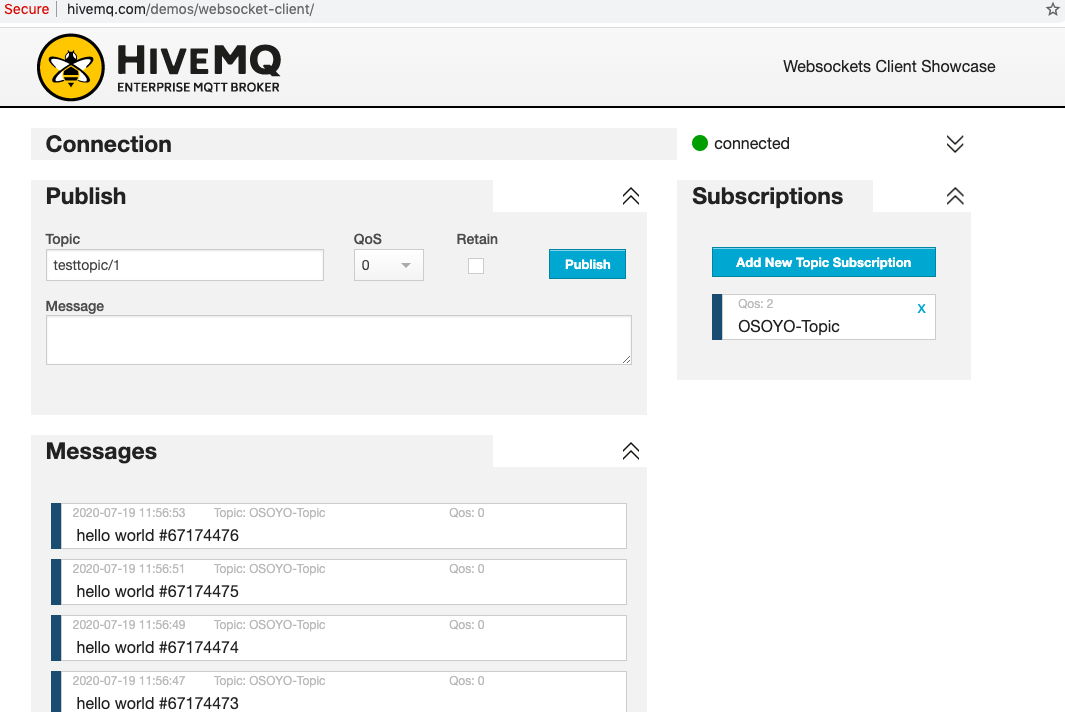


沒有留言:
張貼留言