2020年6月13日 星期六

Convert Binary to 7-Segment Display in Verilog

Convert   Binary to   7-Segment Display in Verilog


module Bin_to_7seg(x,z);

input  [3:0]x;

output reg [6:0]z; 


always @(x) begin

case (x)

4'b0000 :      //Hexadecimal 0

z = 7'b1111110;

4'b0001 :    //Hexadecimal 1

z = 7'b0110000  ;

4'b0010 :  // Hexadecimal 2

z = 7'b1101101 ; 

4'b0011 : // Hexadecimal 3

z = 7'b1111001 ;

4'b0100 : // Hexadecimal 4

z = 7'b0110011 ;

4'b0101 : // Hexadecimal 5

z = 7'b1011011 ;  

4'b0110 : // Hexadecimal 6

z = 7'b1011111 ;

4'b0111 : // Hexadecimal 7

z = 7'b1110000;

4'b1000 :      //Hexadecimal 8

z = 7'b1111111;

4'b1001 :    //Hexadecimal 9

z = 7'b1111011 ;

4'b1010 :  // Hexadecimal A

z = 7'b1110111 ; 

4'b1011 : // Hexadecimal B

z = 7'b0011111;

4'b1100 : // Hexadecimal C

z = 7'b1001110 ;

4'b1101 : // Hexadecimal D

z = 7'b0111101 ;

4'b1110 : // Hexadecimal E

z = 7'b1001111 ;

4'b1111 : // Hexadecimal F

z = 7'b1000111 ;

endcase

end 

endmodule


`timescale 100ns / 100ps
module TB;
// Inputs
reg [3:0] x;
// Outputs
wire [6:0] z;
integer i;
// Instantiate the Unit Under Test (UUT)
Bin_to_7seg uut (.x(x), .z(z));
 
initial begin
// Initialize Inputs
x = 0;
for (i=0;i<=15;i=i+1)
begin
#20
x=i;
    end
#20 
$stop;
end  
endmodule


2020年5月31日 星期日

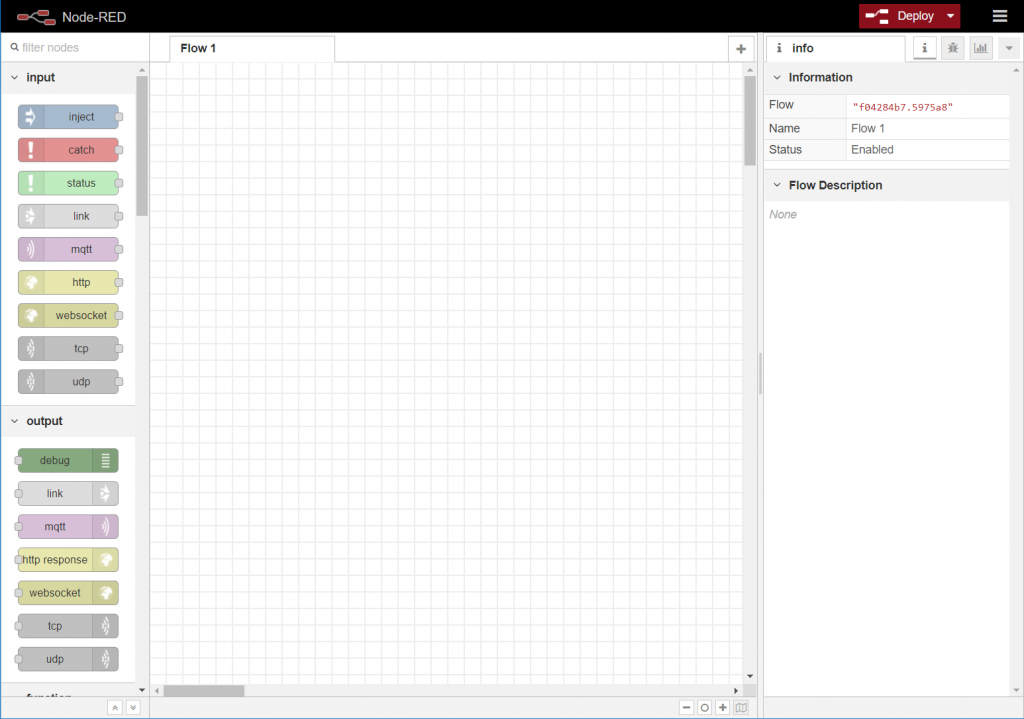
安裝Node-RED

安裝Node-RED

以Windows安裝Node-RED

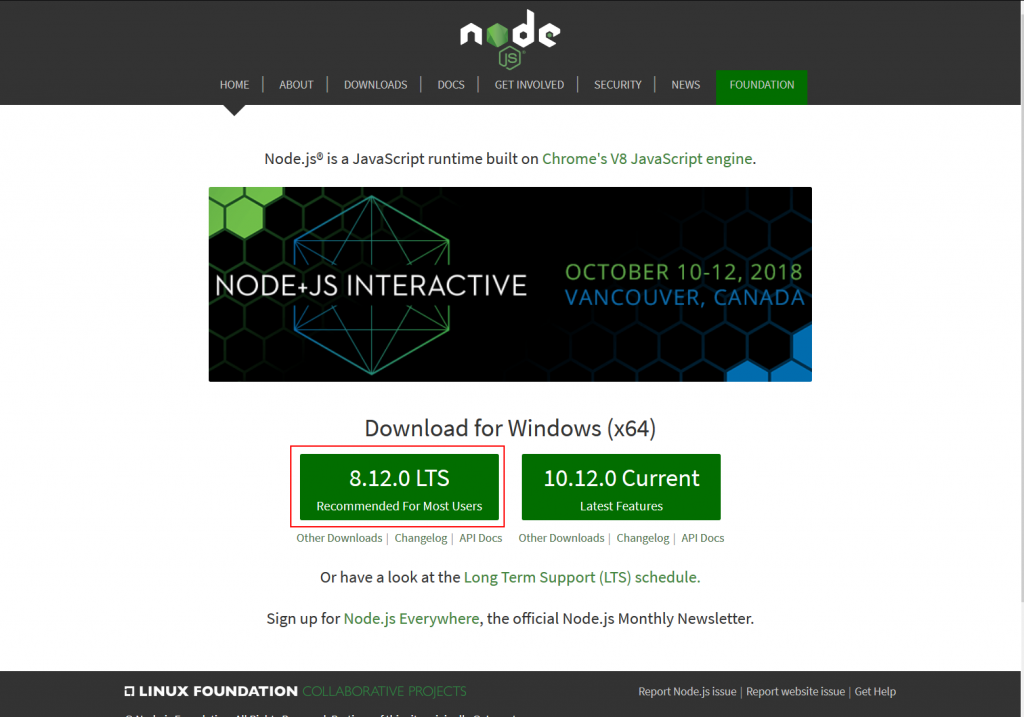
1.先到Node.js官網下載LTS版
https://ithelp.ithome.com.tw/upload/images/20181016/20112219KY7P4ULJ6A.png
2.執行後一路下一步
https://ithelp.ithome.com.tw/upload/images/20181016/20112219NdAuwQwW0N.png
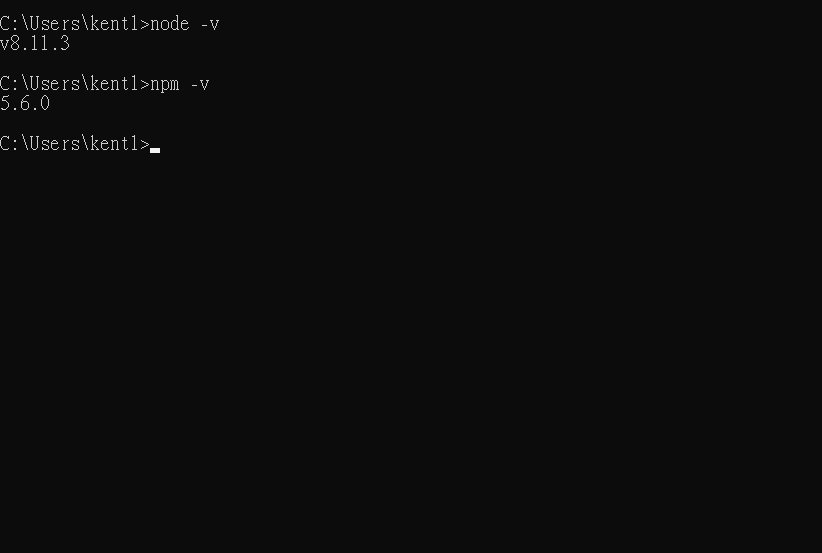
3.確認Node.Js與NPM版本
https://ithelp.ithome.com.tw/upload/images/20181016/20112219CZJhCnvDEn.png
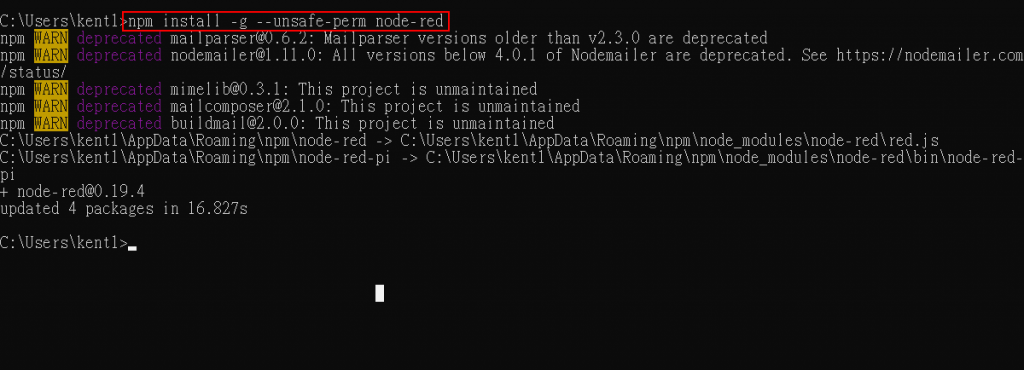
4.輸入 npm install -g --unsafe-perm node-red 安裝Node-RED
https://ithelp.ithome.com.tw/upload/images/20181016/20112219R2UY4wxHiB.png
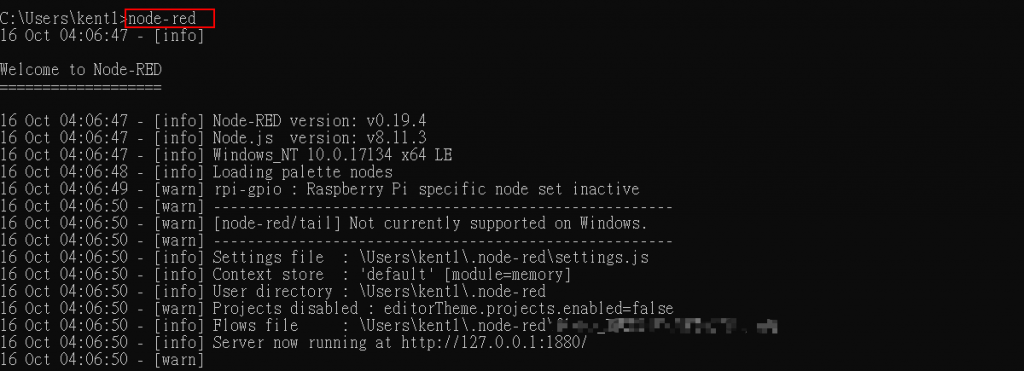
5.輸入node-red啟動Node-RED
https://ithelp.ithome.com.tw/upload/images/20181016/20112219qYt2zzQqBS.png
6.啟動瀏覽器 輸入127.0.0.1:1880
https://ithelp.ithome.com.tw/upload/images/20181016/20112219PvSQ9Mus5k.png
即可使用Node-RED

2020年5月26日 星期二

Binary to BCD Converter

Binary to BCD Converter

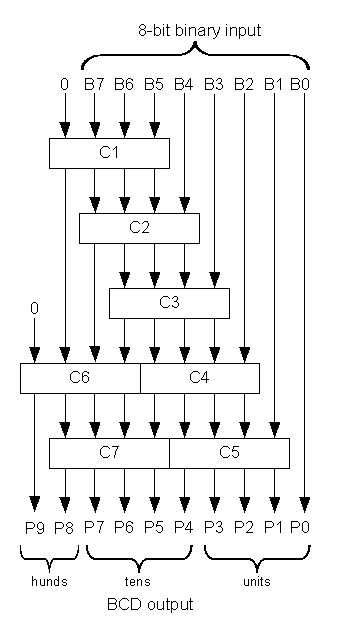
Shift and Add-3 Algorithm


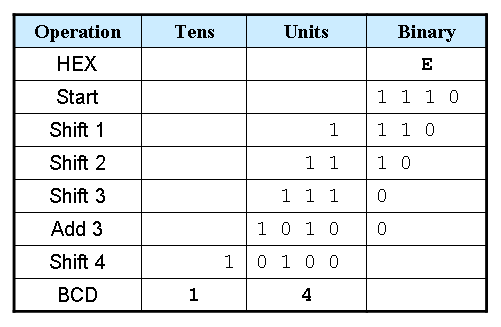
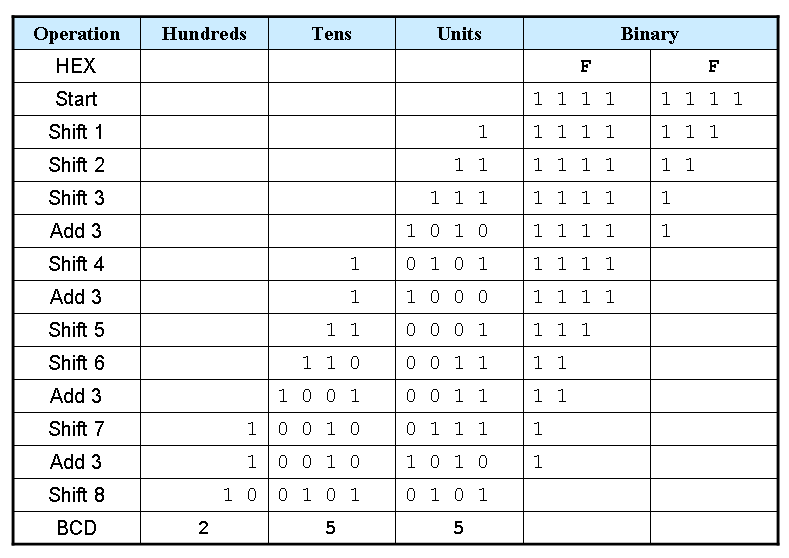
  1. Shift the binary number left one bit.
  2. If 8 shifts have taken place, the BCD number is in the HundredsTens, and Units column.
  3. If the binary value in any of the BCD columns is 5 or greater, add 3 to that value in that BCD column.
  4. Go to 1.
OperationHundredsTensUnitsBinary
HEX


FF
Start


1 1 1 11 1 1 1

Example 1: Convert hex E to BCD


Example 2: Convert hex FF to BCD


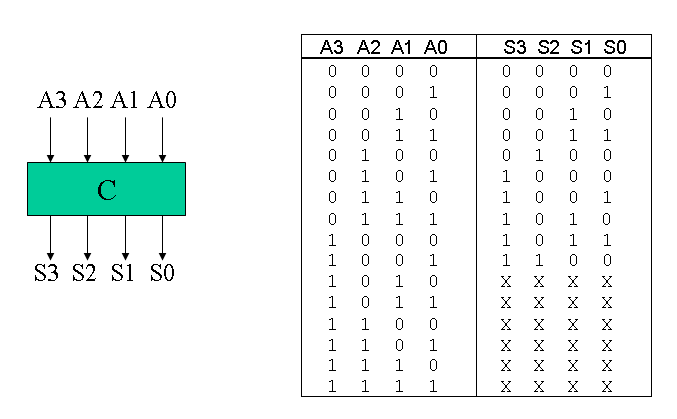
Truth table for Add-3 Module


Here is a Verilog module for this truth table.
module add3(in,out);
input [3:0] in;
output [3:0] out;
reg [3:0] out;

always @ (in)
 case (in)
 4'b0000: out <= 4'b0000;
 4'b0001: out <= 4'b0001;
 4'b0010: out <= 4'b0010;
 4'b0011: out <= 4'b0011;
 4'b0100: out <= 4'b0100;
 4'b0101: out <= 4'b1000;
 4'b0110: out <= 4'b1001;
 4'b0111: out <= 4'b1010;
 4'b1000: out <= 4'b1011;
 4'b1001: out <= 4'b1100;
 default: out <= 4'b0000;
 endcase
endmodule

Binary-to-BCD Converter Module


Here is a structural Verilog module corresponding to the logic diagram.
module binary_to_BCD(A,ONES,TENS,HUNDREDS);
input [7:0] A;
output [3:0] ONES, TENS;
output [1:0] HUNDREDS;
wire [3:0] c1,c2,c3,c4,c5,c6,c7;
wire [3:0] d1,d2,d3,d4,d5,d6,d7;

assign d1 = {1'b0,A[7:5]};
assign d2 = {c1[2:0],A[4]};
assign d3 = {c2[2:0],A[3]};
assign d4 = {c3[2:0],A[2]};
assign d5 = {c4[2:0],A[1]};
assign d6 = {1'b0,c1[3],c2[3],c3[3]};
assign d7 = {c6[2:0],c4[3]};
add3 m1(d1,c1);
add3 m2(d2,c2);
add3 m3(d3,c3);
add3 m4(d4,c4);
add3 m5(d5,c5);
add3 m6(d6,c6);
add3 m7(d7,c7);
assign ONES = {c5[2:0],A[0]};
assign TENS = {c7[2:0],c5[3]};
assign HUNDREDS = {c6[3],c7[3]};

endmodule

General Binary-to-BCD Converter

The linked code is a general binary-to-BCD Verilog module, but I have not personally tested the code.

2020年5月24日 星期日

DE2-115 0000-9999 Counter 十進制計數器

DE2-115 0000-9999 Counter 十進制計數器


module cnt_9999 (
  input  CLOCK_50, // 50 MHz clock
  input  [3:0] KEY,      // Pushbutton[3:0]
  input  [17:0] SW, // Toggle Switch[17:0]
  output [6:0] HEX0,HEX1,HEX2,HEX3,HEX4,HEX5,HEX6,HEX7,  // Seven Segment Digits
  output [8:0] LEDG,  // LED Green
  output [17:0] LEDR   // LED Red
 );
 // blank unused 7-segment digits
//assign HEX0 = 7'b111_1111;
//assign HEX1 = 7'b111_1111;
//assign HEX2 = 7'b111_1111;
//assign HEX3 = 7'b111_1111;
assign HEX4 = 7'b111_1111;
assign HEX5 = 7'b111_1111;
assign HEX6 = 7'b111_1111;
assign HEX7 = 7'b111_1111;

assign LEDR=SW;
// Setup clock divider
wire [6:0] myclock;

wire [3:0]cnt_1s,cnt_10s,cnt_100s,cnt_1000s;
wire tens_en,huns_en,thou_en,thous_10k_en;
wire tc_1s,tc_10s,tc_100s,tc_1000s;
/*
 divide_by_50 d6(clk_1Mhz,CLK,RST);
 divide_by_10 d5(clk_100Khz,clk_1Mhz,RST);
 divide_by_10 d4(clk_10Khz,clk_100Khz,RST);
 divide_by_10 d3(clk_1Khz,clk_10Khz,RST);
 divide_by_10 d2(clk_100hz,clk_1Khz,RST);
 divide_by_10 d1(clk_10hz,clk_100hz,RST);
 divide_by_10 d0(clk_1hz,clk_10hz,RST);
*/
 clock_divider cdiv(CLOCK_50,KEY[0],myclock);
 //module clock_divider(CLK,RST,clock);
 cnt_10 u0(SW[0],myclock[1],KEY[0],cnt_1s,tc_1s);
 //module cnt_10(ce,clk,clr,Q,tc)
 cnt_10 u10(tens_en,myclock[1],KEY[0],cnt_10s,tc_10s);
 cnt_10 u100(huns_en,myclock[1],KEY[0],cnt_100s,tc_100s);
 cnt_10 u1000(thou_en,myclock[1],KEY[0],cnt_1000s,tc_1000s);

 assign tens_en = tc_1s   & SW[0];
 assign huns_en = tc_10s  & tens_en ;
 assign thou_en = tc_100s & huns_en;


  _7seg(cnt_1s , HEX0);
  _7seg(cnt_10s , HEX1);
  _7seg(cnt_100s , HEX2);  
  _7seg(cnt_1000s , HEX3);


endmodule

module clock_divider(CLK,RST,clock);
 input CLK,RST;
 output [6:0] clock;
 wire clk_1Mhz,clk_100Khz,clk_10Khz,clk_1Khz,clk_100hz,clk_10hz,clk_1hz;

 assign clock = {clk_1Mhz,clk_100Khz,clk_10Khz,clk_1Khz,clk_100hz,clk_10hz,clk_1hz};

 divide_by_50 d6(clk_1Mhz,CLK,RST);
 divide_by_10 d5(clk_100Khz,clk_1Mhz,RST);
 divide_by_10 d4(clk_10Khz,clk_100Khz,RST);
 divide_by_10 d3(clk_1Khz,clk_10Khz,RST);
 divide_by_10 d2(clk_100hz,clk_1Khz,RST);
 divide_by_10 d1(clk_10hz,clk_100hz,RST);
 divide_by_10 d0(clk_1hz,clk_10hz,RST);
endmodule


module divide_by_10(Q,CLK,RST);
input CLK, RST;
output Q;
reg Q;
reg [2:0] count;
always @ (posedge CLK or negedge RST)
 begin
  if (~RST)
   begin
    Q <= 1'b0;
    count <= 3'b000;
   end
  else if (count < 4)
   begin 
     count <= count+1'b1;
   end
  else 
   begin
    count <= 3'b000;
    Q <= ~Q;
   end
 end
endmodule

module divide_by_50(Q,CLK,RST);
input CLK, RST;
output Q;
reg Q;
reg [4:0] count;
always @ (posedge CLK or negedge RST)
 begin
  if (~RST)
   begin
    Q <= 1'b0;
    count <= 5'b00000;
   end
  else if (count < 24)
   begin 
     count <= count+1'b1;
   end
  else 
   begin
    count <= 5'b00000;
    Q <= ~Q;
   end
 end
endmodule

module cnt_10(ce,clk,clr,Q,tc);

input ce,clk,clr;
output [3:0]Q;
output tc;

reg [3:0]count;

always@(posedge clk or negedge clr)
begin
if (!clr)
count<=4'h0;
else 
if (ce) 
if (count==4'h9)
count<=4'h0;
else
count<=count+1;
end
assign Q=count;
assign tc= (count==4'h9);

endmodule
//-----------------------------------------
//Common-cathod seven segment display
//using case.....endcase statement
//Filename : sevenseg_case.v
//----------------------------------------- 
module _7seg(hex , seg);
    input  [3:0] hex;
    output [7:0] seg;
    reg    [7:0] seg;
 
 // segment encoding
 //      0
 //     ---  
 //  5 |   | 1
 //     ---   <- 6
 //  4 |   | 2
 //     ---
 //      3
 always @(hex)
 begin
  case (hex)
       // Dot point is always disable
       4'b0001 : seg = 8'b11111001;   //1 = F9H
       4'b0010 : seg = 8'b10100100;   //2 = A4H
       4'b0011 : seg = 8'b10110000;   //3 = B0H
       4'b0100 : seg = 8'b10011001;   //4 = 99H
       4'b0101 : seg = 8'b10010010;   //5 = 92H
       4'b0110 : seg = 8'b10000010;   //6 = 82H
       4'b0111 : seg = 8'b11111000;   //7 = F8H
       4'b1000 : seg = 8'b10000000;   //8 = 80H
       4'b1001 : seg = 8'b10010000;   //9 = 90H
       4'b1010 : seg = 8'b10001000;   //A = 88H
       4'b1011 : seg = 8'b10000011;   //b = 83H
       4'b1100 : seg = 8'b11000110;   //C = C6H
       4'b1101 : seg = 8'b10100001;   //d = A1H
       4'b1110 : seg = 8'b10000110;   //E = 86H
       4'b1111 : seg = 8'b10001110;   //F = 8EH
       default : seg = 8'b11000000;   //0 = C0H
     endcase
   end
   
endmodule


2020年5月22日 星期五

Simple Solver 真值表轉布林代數

Simple Solver 真值表轉布林代數


Simple Solver

Links & Version Info
Download Links
Version 5.5
A Simple Solver free software download includes the application, help files, and dozens of examples.
New Simple Solver versions will be issued promptly to correct any reported bugs, or to provide user-suggested improvements or additional features.
Version 5.5 changes:
- fix minor bug
- All tools: update Help files
DOWNLOAD Simple Solver from SimpleSolverLogic.com
- Verified by Norton 360 & Malwarebytes
CAUTION - All Simple Solver windows must be closed before installing an update
Simple Solver is also available at FreewareFiles
100% Clean - Tested by FreewareFiles.com
And many other reliable sites including:
Softpedia     BestFreeware     BestSoftware     Download.com    

Flip-Flop D , T , JK

Flip-Flop D , T , JK , RS 

module D_FF(D,clk,sync_reset,Q);
input D; // Data input 
input clk; // clock input 
input sync_reset; // synchronous reset 
output reg Q; // output Q 
always @(posedge clk) 
begin
 if(sync_reset==1'b1)
  Q <= 1'b0; 
 else 
  Q <= D; 
end 
endmodule 


`timescale 100ns/1ns
module TB;
reg D,clk,sync_reset;
wire Q;

D_FF UUT(D,clk,sync_reset,Q);

initial begin
  clk=0;
     forever #5 clk = ~clk;  
end 

initial begin
D=0; sync_reset=0;
#10 sync_reset=1;
#10 sync_reset=0;
#12 D=1;
#12 D=0;
#12 D=1;
#10 sync_reset=1;
#12 D=1;
#10 $stop;
end
endmodule


module T(T,clk,sync_reset,Q); // T Flip Flop
input T; // Data input 
input clk; // clock input 
input sync_reset; // synchronous reset 
output reg Q; // output Q 

always @(posedge clk) 
begin
 if(sync_reset==1'b1)

  Q <= 1'b0; 
 else 
 if (T)
          Q <= ~Q;
      else
          Q <= Q;
end 
endmodule 

`timescale 100ns/1ns
module TB;
reg T,clk,sync_reset;
wire Q;

T UUT(T,clk,sync_reset,Q);

initial begin
  clk=0;
     forever #5 clk = ~clk;  
end 

initial begin
T=0; sync_reset=0;
#10 sync_reset=1;
#10 sync_reset=0;
#12 T=1;
#12 T=0;
#18 T=1;
#10 sync_reset=1;
#25 T=1;
#10 $stop;
end
endmodule

module JK_FF (J,K,clk,sync_reset,Q);
 input J,K,clk,sync_reset;
 output reg Q;
  
 always @ (posedge clk) begin
if (sync_reset==1'b1)
Q <= 1'b0; 
else
      case ({J,K})
         2'b00 :  Q <= Q;
         2'b01 :  Q <= 0;
         2'b10 :  Q <= 1;
         2'b11 :  Q <= ~Q;
      endcase
end

endmodule

`timescale 100ns/1ns
module TB;
reg J,K,clk,sync_reset;
wire Q;

JK_FF UUT (J,K,clk,sync_reset,Q);

initial begin
  clk=0;
     forever #5 clk = ~clk;  
end 

initial begin
J=1;K=0; sync_reset=0;
#10 sync_reset=1;
#10 sync_reset=0;
#12 J=1;K=0;
#12 J=1;K=1;
#12 J=0;K=1;
#10 sync_reset=1;
#12 J=1;K=1;
#10 sync_reset=0;
#12 J=0;K=1;
#12 J=1;K=0;
#10 $stop;

end

endmodule


Digital System Design using FPGA

Digital System Design using FPGA

https://esrd2014.blogspot.com/

Combinatorial Circuit Design

Full Adder
4 bit Carry Ripple Adder
8 bit Magnitude Comparator
8-to-1 Multiplexer
3-to-8 Decoder
Barrel Shifter
ALU

Sequential Circuit Design

Node-Red --> MQTT --> Fuxa

Node-Red --> MQTT --> Fuxa      FUXA(一個開源的 Web HMI / SCADA 自動化監控軟體)的專案設定檔 。 這份設定檔完整定義了 HMI 監控畫面的 後端通訊(MQTT 連線、點位標籤) 與 前端網頁圖形介面(SVG 畫布...