實驗說明:典型的RFID應用,例如門禁卡,都是事先在微電腦中儲存特定RFID卡片的識別碼。當持卡人掃描門禁卡時,系統將讀取並且比對儲存值,如果有相符,就開門讓持卡人通過。


==============ESP8266程式=====================
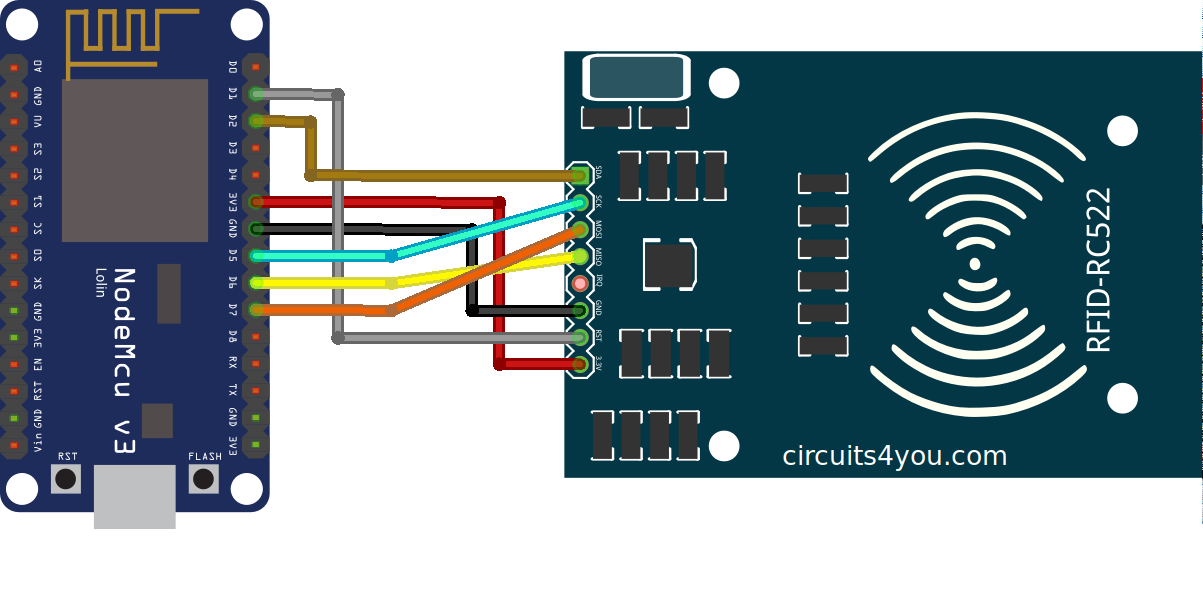
/* Wiring RFID RC522 module
=============================================================================
GND = GND 3.3V = 3.3V
The following table shows the typical pin layout used:
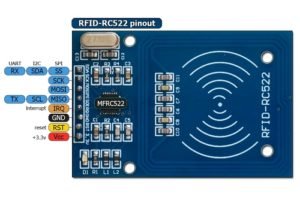
Signal MFRC522 WeMos D1 mini NodeMcu Generic
RST/Reset RST D3 [1] D3 [1] GPIO-0 [1]
SPI SS SDA [3] D8 [2] D8 [2] GPIO-15 [2]
SPI MOSI MOSI D7 D7 GPIO-13
SPI MISO MISO D6 D6 GPIO-12
SPI SCK SCK D5 D5 GPIO-14
[1] (1, 2) Configurable, typically defined as RST_PIN in sketch/program.
[2] (1, 2) Configurable, typically defined as SS_PIN in sketch/program.
[3] The SDA pin might be labeled SS on some/older MFRC522 boards
*/
#include <ESP8266WiFi.h>
#include <PubSubClient.h>
#include <SPI.h>
#include "MFRC522.h"
#define RST_PIN D3 // RST-PIN für RC522 - RFID - SPI - D3
#define SS_PIN D8 // SDA-PIN für RC522 - RFID - SPI - D8
#define BUILTIN_LED 2 // 門鎖的控制訊號接腳
bool lockerSwitch = false; // 伺服馬達的狀態
// Update these with values suitable for your network.
//const char *ssid = "PTS-2F";
//const char *pass = "PTS6662594";
const char *ssid = "74170287";
const char *pass = "24063173";
//const char *ssid = "alex9ufo";
//const char *pass = "alex9981";
//const char *ssid = "yourSSID"; // change according to your Network - cannot be longer than 32 characters!
//const char *pass = "yourPASSWORD"; // change according to your Network
#define MQTTid "" //id of this mqtt client
#define MQTTip "broker.mqtt-dashboard.com" //ip address or hostname of the mqtt broker
#define MQTTport 1883 //port of the mqtt broker
#define MQTTuser "alex9ufo" //username of this mqtt client
#define MQTTpsw "alex9981" //password of this mqtt client
//#define MQTTuser "your_username" //username of this mqtt client
//#define MQTTpsw "your_password" //password of this mqtt client
#define MQTTpubQos 2 //qos of publish (see README)
#define MQTTsubQos 1 //qos of subscribe
MFRC522 mfrc522(SS_PIN, RST_PIN); // 建立MFRC522物件
MFRC522::MIFARE_Key key;
//Variables
long lastMsg = 0;
char jsonChar[100];
String IDNo_buf="";
byte nuidPICC[4];
//====================================================
struct RFIDTag { // 定義結構
byte uid[4];
char *name;
};
//==================================================
struct RFIDTag tags[] = { // 初始化結構資料,請自行修改RFID識別碼。
{{0x70,0x21,0xED,0x10}, "Alex9ufo"},
{{0x44,0x51,0xBB,0x96}, "RaspberryPi"},
{{0x15,0x8,0xA,0x53}, "Espruino"}
};
byte totalTags = sizeof(tags) / sizeof(RFIDTag); // 計算結構資料筆數,結果為3。
//=============================================================================
boolean pendingDisconnect = false;
void mqttConnectedCb(); // on connect callback
void mqttDisconnectedCb(); // on disconnect callback
void mqttDataCb(char* topic, byte* payload, unsigned int length); // on new message callback
WiFiClient wclient;
PubSubClient client(MQTTip, MQTTport, mqttDataCb, wclient);
//=============================================================================
String printHex(byte *buffer, byte bufferSize) {
String id = "";
for (byte i = 0; i < bufferSize; i++) {
id += buffer[i] < 0x10 ? "0" : "";
id += String(buffer[i], HEX);
}
return id;
}
//=============================================================================
void mqttConnectedCb() {
Serial.println("connected");
// Once connected, publish an announcement...
client.publish("alex9ufo/outTopic/RFID/json", jsonChar, MQTTpubQos, true); // true means retain
// ... and resubscribe
client.subscribe("alex9ufo/inTopic", MQTTsubQos);
}
//=============================================================================
void mqttDisconnectedCb() {
Serial.println("disconnected");
}
//=============================================================================
void mqttDataCb(char* topic, byte* payload, unsigned int length) {
/*
you can convert payload to a C string appending a null terminator to it;
this is possible when the message (including protocol overhead) doesn't
exceeds the MQTT_MAX_PACKET_SIZE defined in the library header.
you can consider safe to do so when the length of topic plus the length of
message doesn't exceeds 115 characters
*/
char* message = (char *) payload;
message[length] = 0;
//String message;
Serial.print("Message arrived [");
Serial.print(topic);
Serial.print("] ");
Serial.println(message);
String message1;
for (int i = 0; i < length; i++) {
message1 = message1 + (char)payload[i]; //Conver *byte to String
}
//Serial.print(message);
if ((message1 == "#LockOff") || (message1 == "#LockOn"))
{
lockerSwitch = !lockerSwitch; // 切換鎖的狀態
locker(lockerSwitch); // 開鎖或關鎖
} //LED on
}
//======================================================
void process_mqtt() {
if (WiFi.status() == WL_CONNECTED) {
if (client.connected()) {
client.loop();
} else {
// client id, client username, client password, last will topic, last will qos, last will retain, last will message
if (client.connect(MQTTid, MQTTuser, MQTTpsw, MQTTid "/status", 2, true, "0")) {
pendingDisconnect = false;
mqttConnectedCb();
}
}
} else {
if (client.connected())
client.disconnect();
}
if (!client.connected() && !pendingDisconnect) {
pendingDisconnect = true;
mqttDisconnectedCb();
}
}
//=============================================================================
// 開鎖或關鎖
void locker(bool toggle) {
if (toggle) {
digitalWrite(BUILTIN_LED,HIGH); // 開鎖
} else {
digitalWrite(BUILTIN_LED,LOW); // 關鎖
}
}
//=============================================================================
void setup_wifi() {
delay(10);
// We start by connecting to a WiFi network
Serial.println();
Serial.print("Connecting to ");
Serial.println(ssid);
WiFi.begin(ssid, pass);
while (WiFi.status() != WL_CONNECTED) {
delay(500);
Serial.print(".");
}
Serial.println("");
Serial.println("WiFi connected");
Serial.println("IP address: ");
Serial.println(WiFi.localIP());
}
//=============================================================================
void setup() {
delay(100);
Serial.begin(115200);
setup_wifi();
pinMode(BUILTIN_LED, OUTPUT); // 將門鎖物件附加在數位2腳
Serial.println(F("Booting...."));
Serial.println();
Serial.print("size of RFIDTag:");
Serial.println(sizeof(RFIDTag));
Serial.print("size of tag:");
Serial.println(sizeof(tags));
Serial.println("RFID reader is ready!");
SPI.begin();
mfrc522.PCD_Init(); // 初始化MFRC522讀卡機模組
for (byte i = 0; i < 6; i++) {
key.keyByte[i] = 0xFF;
}
locker(lockerSwitch);
}
//=============================================================================
void loop() {
process_mqtt();
// 確認是否有新卡片
if (mfrc522.PICC_IsNewCardPresent() && mfrc522.PICC_ReadCardSerial()) {
byte *id = mfrc522.uid.uidByte; // 取得卡片的UID
byte idSize = mfrc522.uid.size; // 取得UID的長度
bool foundTag = false; // 是否找到紀錄中的標籤,預設為「否」。
byte i=0;
// Store NUID into nuidPICC array
for (byte i = 0; i < 4; i++) {
nuidPICC[i] = mfrc522.uid.uidByte[i];
}
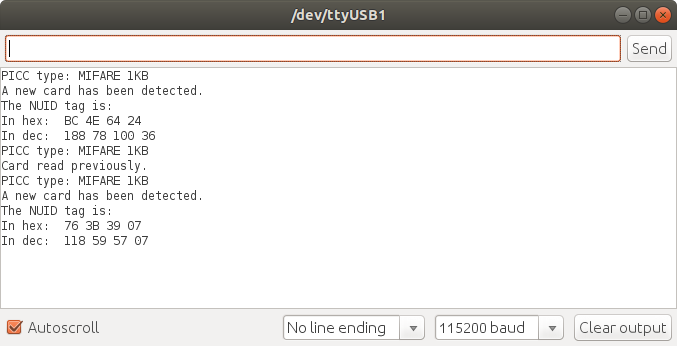
Serial.println(F("The NUID tag is:"));
Serial.print(F("In hex: "));
printHex(mfrc522.uid.uidByte, mfrc522.uid.size);
Serial.println();
for (byte i=0; i<totalTags; i++) {
if (memcmp(tags[i].uid, id, idSize) == 0) { // 比對陣列資料值
Serial.println(tags[i].name); // 顯示標籤的名稱
foundTag = true; // 設定成「找到標籤了!」
//lockerSwitch = !lockerSwitch; // 切換鎖的狀態
//locker(lockerSwitch); // 開鎖或關鎖
//Serial.println(tags[i].name);
IDNo_buf="";
IDNo_buf=tags[i].name;
// Convert data to JSON string
String json =
"{\"data\":{"
"\"RFID_No\": \"" + IDNo_buf + "\"}"
"}";
// Convert JSON string to character array
json.toCharArray(jsonChar, json.length()+1);
if (client.connected()) {
Serial.print("Publish message: ");
Serial.println(json);
// Publish JSON character array to MQTT topic
client.publish("alex9ufo/outTopic/RFID/json",jsonChar);
} //if (client.connected())
break; // 退出for迴圈
} // if (memcmp(tags[i].uid, id, idSize) == 0)
}
//===================================================
mfrc522.PICC_HaltA(); // 讓卡片進入停止模式
//===================================================
if (!foundTag) { // 若掃描到紀錄之外的標籤,則顯示"Wrong card!"。
Serial.println("Wrong card!");
// 如果鎖是開啟狀態,則關閉它。
if (lockerSwitch) {
lockerSwitch = false;
locker(lockerSwitch);
} // if (lockerSwitch)
} //if (!foundTag)
} //if (mfrc522.PICC_IsNewCardPresent() && mfrc522.PICC_ReadCardSerial())
}
=======================NodeRED程式=======================
[{"id":"d37f7418.4b8ec8","type":"mqtt in","z":"55a589f0.bf8ea8","name":"MQTT","topic":"alex9ufo/outTopic/RFID/json","qos":"2","broker":"40bf4d5e.0395f4","x":70,"y":120,"wires":[["334ca16b.f8f30e","15a851b2.46a45e"]]},{"id":"334ca16b.f8f30e","type":"function","z":"55a589f0.bf8ea8","name":"json+時分秒","func":"var date = new Date();\nvar h = date.getHours();\nvar m = date.getMinutes();\nvar s = date.getSeconds();\nif(h<10){\n h = '0'+h;\n}\nif(m<10){\n m = '0' + m;\n}\nif(s<10){\n s = '0' + s;\n}\nmsg.payload = 'Time:(' + h + ':' + m + ':' + s + ')'+ msg.payload ;\nreturn msg;\n","outputs":1,"noerr":0,"x":230,"y":80,"wires":[["fe4ab03c.f3e","86034ee7.a3f27"]]},{"id":"15a851b2.46a45e","type":"switch","z":"55a589f0.bf8ea8","name":"","property":"payload","propertyType":"msg","rules":[{"t":"cont","v":"Alex9ufo","vt":"str"},{"t":"cont","v":"RaspberryPi","vt":"str"}],"checkall":"true","repair":false,"outputs":2,"x":110,"y":180,"wires":[["7d8c732d.60422c"],["980fd08a.de36e"]]},{"id":"7d8c732d.60422c","type":"function","z":"55a589f0.bf8ea8","name":"#Lock_on","func":"var lock=1;\nmsg.payload =lock;\nreturn msg;\n","outputs":1,"noerr":0,"x":260,"y":160,"wires":[["832fdb60.93f838"]]},{"id":"980fd08a.de36e","type":"function","z":"55a589f0.bf8ea8","name":"#Lock_Off","func":"var lock=1;\nmsg.payload =lock;\nreturn msg;\n","outputs":1,"noerr":0,"x":260,"y":200,"wires":[["832fdb60.93f838"]]},{"id":"832fdb60.93f838","type":"function","z":"55a589f0.bf8ea8","name":"#Lock on or off","func":"if( context.global.i == undefined ) context.global.i = 0;\ncontext.global.i += msg.payload;\nif (context.global.i %2 === 0 ){\n msg.payload = \"#LockOn\";\n} else {\n msg.payload = \"#LockOff\";\n}\nreturn msg;\n","outputs":1,"noerr":0,"x":420,"y":180,"wires":[["881bbdc0.f73ae","8446d583.6259c8"]]},{"id":"fe4ab03c.f3e","type":"ui_text","z":"55a589f0.bf8ea8","group":"e4b1387a.934b88","order":0,"width":0,"height":0,"name":"","label":"MQTT_Sub_Message","format":"{{msg.payload}}","layout":"row-center","x":540,"y":80,"wires":[]},{"id":"86034ee7.a3f27","type":"debug","z":"55a589f0.bf8ea8","name":"","active":true,"tosidebar":true,"console":false,"tostatus":false,"complete":"payload","x":510,"y":120,"wires":[]},{"id":"881bbdc0.f73ae","type":"mqtt out","z":"55a589f0.bf8ea8","name":"","topic":"alex9ufo/inTopic","qos":"1","retain":"false","broker":"40bf4d5e.0395f4","x":600,"y":160,"wires":[]},{"id":"8446d583.6259c8","type":"ui_text","z":"55a589f0.bf8ea8","group":"e4b1387a.934b88","order":0,"width":0,"height":0,"name":"","label":"MQTT_Pub_Message","format":"{{msg.payload}}","layout":"row-center","x":620,"y":220,"wires":[]},{"id":"40bf4d5e.0395f4","type":"mqtt-broker","broker":"broker.mqtt-dashboard.com","port":"1883","clientid":"","usetls":false,"compatmode":true,"keepalive":15,"cleansession":true,"birthQos":"0","willQos":"0"},{"id":"e4b1387a.934b88","type":"ui_group","z":"","name":"Control led ESP8266 (ESP32)","tab":"8b6381a9.6f9d6","order":1,"disp":true,"width":"10","collapse":false},{"id":"8b6381a9.6f9d6","type":"ui_tab","name":"Tab 1","icon":"dashboard","order":1}]