2014年11月12日 星期三

Using Transistor as a Switch

Using Transistor as a Switch

源自於 http://www.ermicro.com/blog/?p=423
Most of microcontrollers work within 5 volt environment and the I/O port can only handle current up to 20mA; therefore if we want to attach the microcontroller’s I/O port to different voltage level circuit or to drive devices with more than 20mA; we need to use the interface circuit. One of the popular method is to use the Bipolar Junction Transistor (BJT) or we just called it transistor in this tutorial. I have to make clear on this BJT type to differentiate among the other types of transistors family such as FET (Field Effect Transistor), MOSFET (Metal Oxide Semiconductor FET), VMOS (Vertical MOSFET) and UJT (Uni-Junction Transistor).
A. The Switch
The transistor actually works as a current gainer; any current applied to the base terminal will be multiplied by the current gain factor of the transistor which known as hFE. Therefore transistor can be used as amplifier; any small signal (very small current) applied to the base terminal will be amplified by the factor of hFE and reflected as a collector current on the collector terminal side.
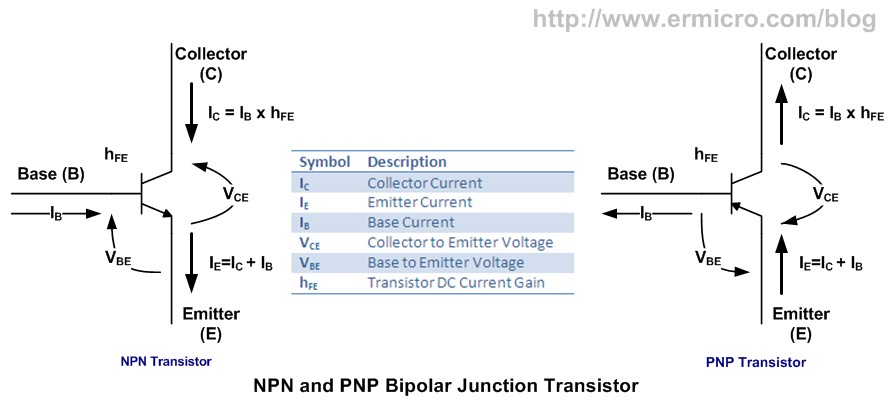
All the transistors have three state of operation:
  1. Off state: in this state there is no base current applied or IB = 0.
  2. On active state: in this state any changes in IB will cause changes in IC as well or IC = IB x hFE. This type of state is suitable when we use transistor as a signal amplifier because transistor is said is in the linear state. For example if we have a transistor with gain of 100 and we increase the IB from 10uA to 100uA; this will cause the IC to swing from 1000uA to 10000uA (1 mA to 10 mA).
  3. On saturate state: in this state any changes in IB will not cause changes in IC anymore (not linear) or we could say IC is nearly constant. We never use this state to run the transistor as a signal amplifier (class A amplifier) because the output signal will be clamped when the transistor is saturate. This is the type of state that we are looking for on this tutorial.
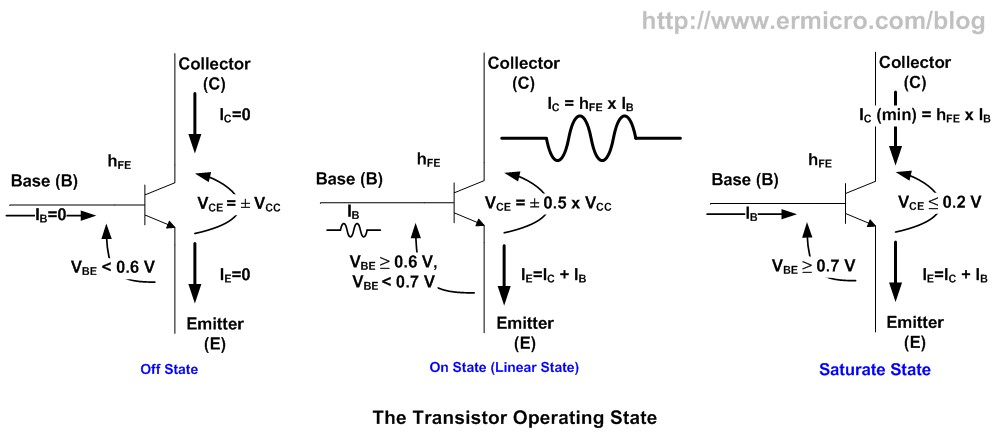
From the picture above we could see the voltage and current condition of transistor on each state; if you notice when transistor is in off state the voltage across collector and emitter terminal is equal to the supplied voltage, this is equivalent to the open circuit and when transistor is in saturate state the collector to emitter voltage is equal or less then 0.2 Volt which is equivalent to the close circuit. Therefore to use transistor as a switch we have to make transistor OFF which equivalent to the logical “0” and SATURATE which is equivalent to the logical “1“.
One of the famous diagrams that show the transistor operating state is called the transistor static characteristic curve as shown on this following picture:
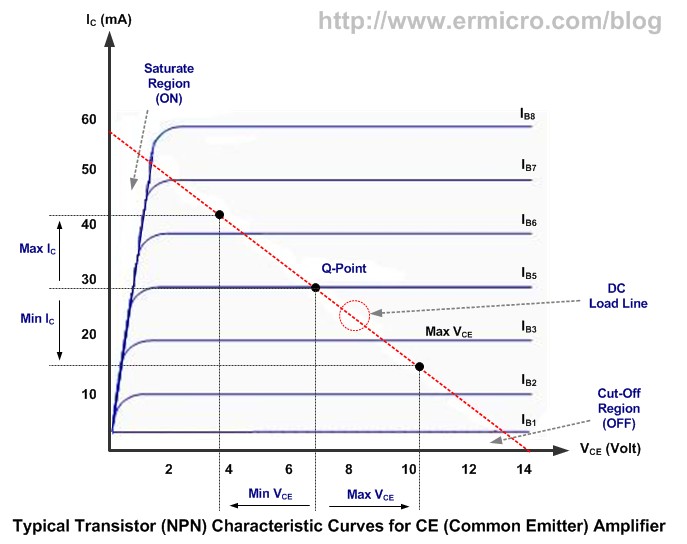
When we operate transistor as the class A common emitter amplifier usually we choose to bias the transistor (apply voltage on VBE and VCE) in such a way (Q-Point) that IC and VCE (output) will swing to its maximum or minimum value without any distortion (swing into the saturation or cut-off region) when the IB (input) swing to its maximum or minimum value; but when we operate the transistor as switch we intentionally push the transistor into its saturation region to get the lowest possible VCE(i.e. near 0.2 volt) when we need to make the transistor ON (switch ON) and into its cut-off region when we need to make the transistor OFF (switch OFF).
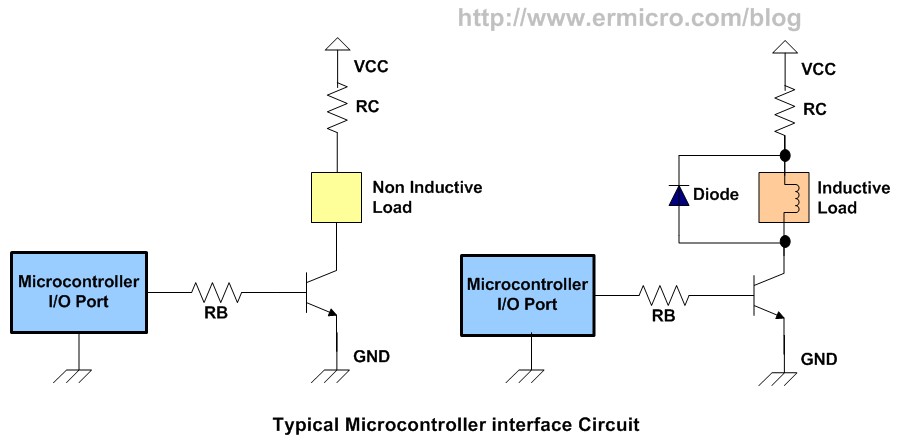
The above diagram show a typical microcontroller interface circuit using NPN transistor; the RBresistor is used to control the current on base terminal that make transistor OFF and ON (saturate); while the RC resistor is the current limiter for the load. if the load operate with the same voltage as the supplied power (Vcc) you can by pass the RC (not use).
Notice the diode (also known as the clamp diode) in the inductive load circuit is needed to protect the transistor again the EMF (Electromotive Force) voltage generated by the inductor component when the transistor is switched on and off rapidly, this voltage is oppose the source voltage. The diode will act as a short circuit to the high voltage generated by the inductor component, you can use any general purpose diode with capable on handling minimum 1 A of current such as 1N4001, 1N4002, etc.
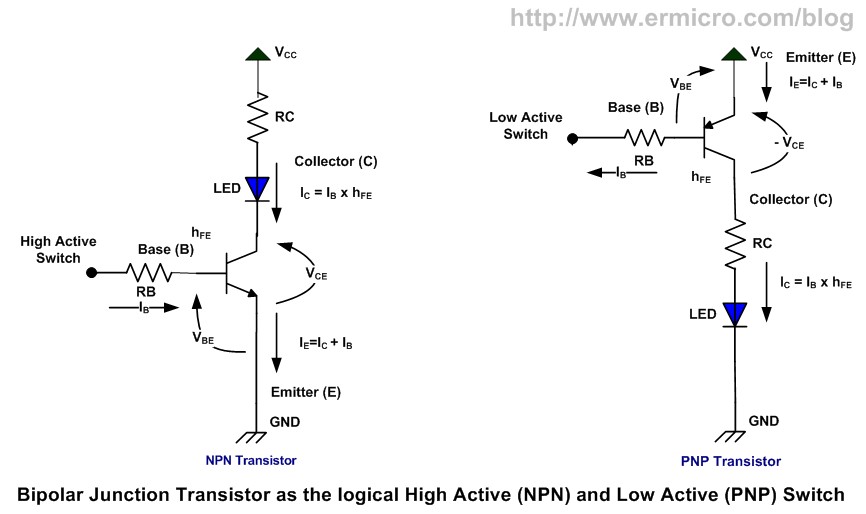
On the picture shown above you could see how we connect the transistor as the high active switch (logical high) also known as low side switch using NPN transistor and the low active switch (logical low) also known as high side switch using PNP transistor.
Ok let’s calculate each of the RB and RC value on this following NPN transistor circuit:
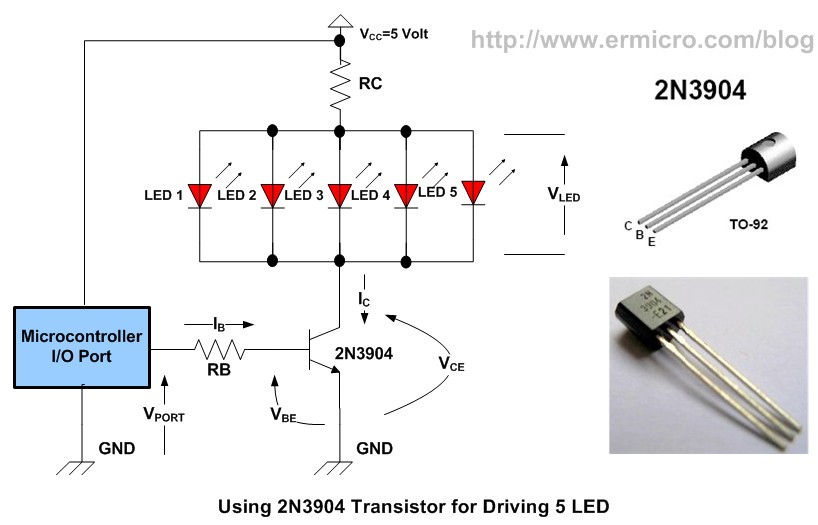
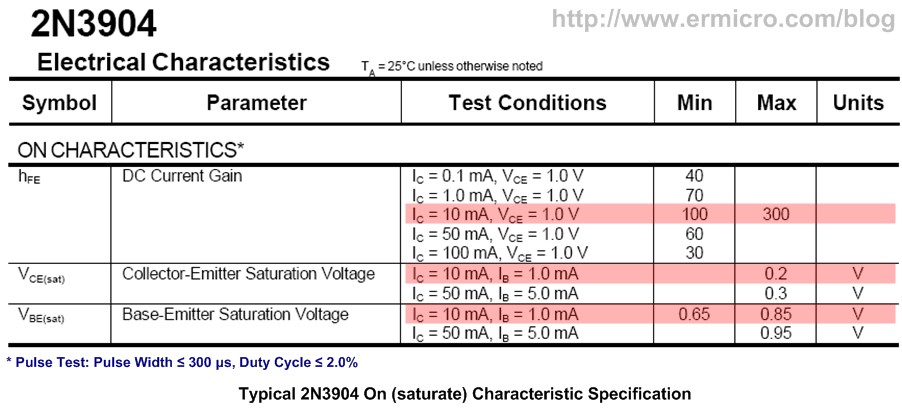
On the circuit above we are going to use 2N3904 (the cheap general purpose transistor where you could easily found on your local market) to drive 5 LED from microcontroller port, from the 2N3904 datasheet we get this following information:
IC max = 200mA (this is maximum value that will make your transistor smoked, in practical application always use just half of the maximum value mentioned on the datasheet), hFE = 100 to 300, VBE saturate = 0.65 Volt, VCE saturate = 0.2 Volt
For most transistor in general we can use VBE = 0.7 Volt (should be saturate) and VCE = 0 Volt. Using the 5 volt power supply (VCC) and assuming VLED = 2 Volt, with each of them consuming 15 mA, we could calculate the RC value using the Ohm’s law as follow:
IC = 5 x 15 mA = 75mA (0.075 A), this current is still far bellow the maximum IC allowed by 2N3904 transistor.
RC = (VCC – VLED) / IC = (5 – 2) / 0.075 = 40 Ohm
Power Dissipation on the RC resistor will be
P = (VCC – VLED) x IC = (5 – 2) x 0.075 = 0.225 Watt
Base on the above calculation we could use the nearest higher value available on the market; which is 47 Ohm, 0.5 watt resistor (for heat dissipation usually we use twice of the watt value calculated).
Assuming the hFE minimum is 100; the minimum current required in the transistor’s base terminal to drive the LED is:
IC = hFE x IB
IB = IC / hFE = 0.075 / 100 = 0.00075 A (0.75 mA)
This current can easily be supplied by most microcontroller I/O port; which is capable to drive up to 20 mA output current. Again by applying the Ohm’s law we could calculate the RB value as follow:
RB = (VPORT – VBE) / IB
Assuming the minimum average voltage of microcontroller I/O port (VPORT) with logical “1” is about 4.2 volt (the microcontroller is powered by 5 volt supply):
RB = (4.2 – 0.7) / 0.00075 = 4666.66 Ohm
Power dissipation on the RC resistor will be
P = (VPORT – VBE) x IB = (4.2 – 0.7) x 0.00075 = 0.002625 Watt
Base on the result you could use 4K7 Ohm0.25 Watt resistor (this is the common resistor which you could easily found on the local market i.e. 0.25 watt and 0.5 watt).
Use this RB calculation as your maximum reference value; in the real world most of the transistorshFE is vary and being measured (tested) with different VCE and Ivalue not to mention different specification even though you use the same transistor type. Therefore the real RB value could be lower than 4K7 if you really want to drive the transistor into its fully saturate mode where the VCEnear 0.2 volt.
Now the question is how we determine the exact value? To answer to this question I build this following testing circuit base on the RC and RB calculated value above using the Atmel AVR ATTiny25 microcontroller to blink the five LED:
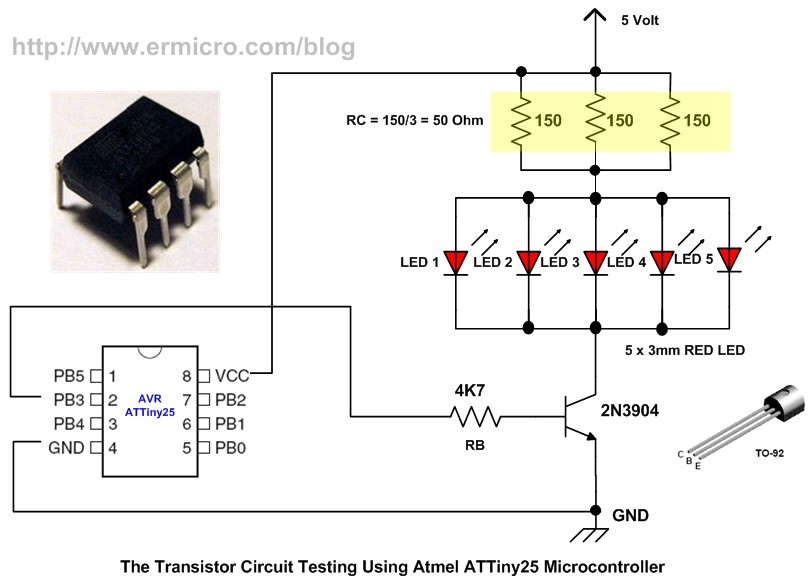
Note: the reason I used RC = 3×150 Ohm because at that time I run out the required 47 Ohm resistor, therefore you could use just single 47 Ohm resistor or if you only have 150 Ohm as I did, you could use them as I did.
Using Transistor as a Switch
Bellow is the C Program that I used to test this circuit:
//***************************************************************************
//  File Name   : trswitch.c
//  Version   : 1.0
//  Description   : Transistor as Switch: Simple LED Blinker
//  Author     : RWB
//  Target     : Atmel AVR ATTiny25 Microcontroller
//  Compiler      : AVR-GCC 4.3.0; avr-libc 1.6.2 (WinAVR 20090313)
//  IDE           : Atmel AVR Studio 4.17
//  Programmer    : Atmel AVRISPmkII
//  Last Updated  : 1 November 2009
//***************************************************************************
#include <avr/io.h>
#include <util/delay.h>
int main(void)
{
   // Initial I/O
   DDRB |= (1<<PB3);       // Set PB3 as Output, Others as Input
   PORTB &= ~(1<<PB3);     // Reset the PB3

   for(;;) {               // Loop Forever
     PORTB |= (1<<PB3);    // Port PB3 High
     _delay_ms(3000);      // Delay 3 Second
     PORTB &= ~(1<<PB3);   // Port PB3 Low
     _delay_ms(1000);      // Delay 1 Second
   }
   return 0;            // Standard Return Code
}
/* EOF: trswitch.c */
The program simply blink all the LED by toggling the AVR ATTiny25 microcontroller PB3 output port high for about 3 second and low for about 1 second and here is the test result when the PB3 port swing to the logical high:
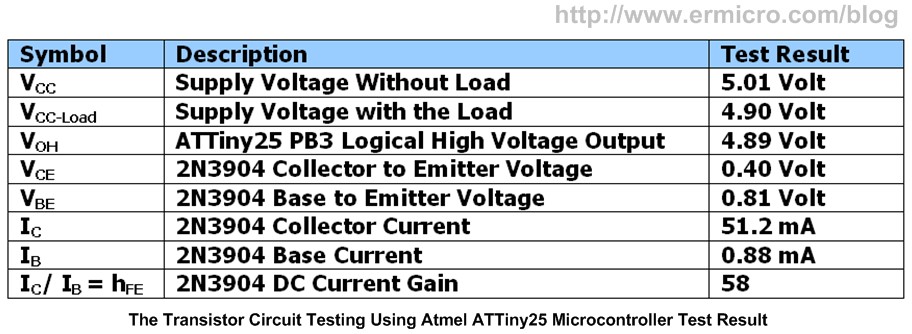
As you’ve seen from the result there is about 0.4 volt drop on the collector to emitter (VCE) terminal instead of 0 Volt as we assume on the above calculation and the DC current gain is about 58 instead of 100 again as we assume on the above calculation. Now you understand there are tremendous different result between the 2N3904 transistor datasheet and my test circuit, this is because the 2N3904 datasheet is measured using the PWM (Pulse Width Modulation) with period for about 300 us (micro second) and duty cycle for about 2%, the reason to use this very short pulse period method in the measurement is because they don’t want to overheat the transistor junction; where this junction heating will vary the transistor hFE measurement significantly.
On my test circuit above; I used 3 second to make the 2N3904 transistor ON (saturate, VBE = 0.81 Volt, VCE = 0.4 Volt) and 1second to make it OFF. The other factor that make the test result differ is the various manufacture specification even though we used the same transistor type. Therefore the answer to the above question is; there is no exact value for RC and RB; is depend on your application but it save to use the above method to calculate the RC and RB and then do the circuit prototyping to test your design, next adjust your RC and RB value accordingly.
Some calculation suggestion is to use the collector to base current ratio of 10 (regardless of the transistor hFE value) to force the transistor into fully saturate (VCE = 0.2 Volt, as shown on the datasheet above) by using this following formula:
IB = IC / hFE = IC / 10
This is what I called a “maximum saturate calculation method” (also known as worst-case design procedure), again as you’ve seen from the real test circuit result above even though we drive the VBEmore than 0.7 volt, we still get the hFE for about 58 and Ifor about 0.88 mA which is useful in the microcontroller application (for more information you could read  “Powering Your Microcontroller’s Base Project” on this blog), therefore for practical application I would suggest; if you want to use this maximum saturate calculation method to determine the base resistor (RB) value, make sure at least you double the calculated value. For example to determine the RB on the test circuit above using this maximum saturate calculation method:
IB = IC / hFE = 0.075 / 10 = 0.0075 A (7.5 mA)RB = (4.2 – 0.7) / 0.0075 = 466.66 Ohm
By using twice the calculated value you will get 933.32 Ohm, or you could use the 1K Ohmstandard resistor.
In typical rapid switching transistor application actually we don’t drive the transistor into its full saturate state (i.e. VCE = 0.2 Volt),  because when the transistor is fully saturate, it tend to have a longer switching time (i.e. from ON to OFF to ON again). The VCE = 0.4 volt as shown on the real test circuit above is already adequate for most switching application, while we could still take advantage of the low transistor base current (i.e. IB = 0.88 mA). You could see this test circuit on the video at the end of this article.
B. Driving the Relay
Relay perhaps is one of the oldest electronic components that could be tracked back from the early years when we first use the electricity in our life. A relay basically is an electrical switch that uses the electromagnetic solenoid to control a switch contact. Because it use the solenoid (inductive load), therefore we need to use a diode to protect the transistor against the EMF. The main advantage of using a relay is that we could “relaying” or pass on the switch effect from a low power side on its solenoid to the high power side on its metal contact by using the electromagnetic effect, where both of the solenoid and contact has its own separate electrical specification.
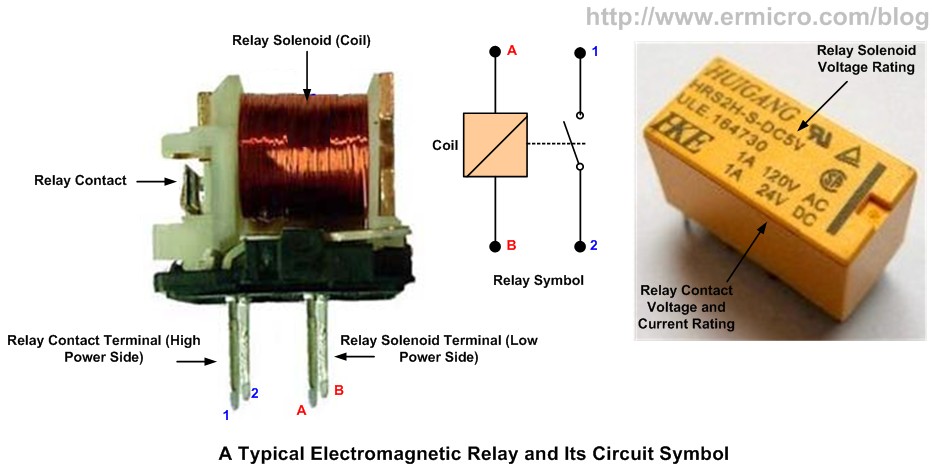
Now using the same principal we could easily calculate the RC and RB value on this following circuit:
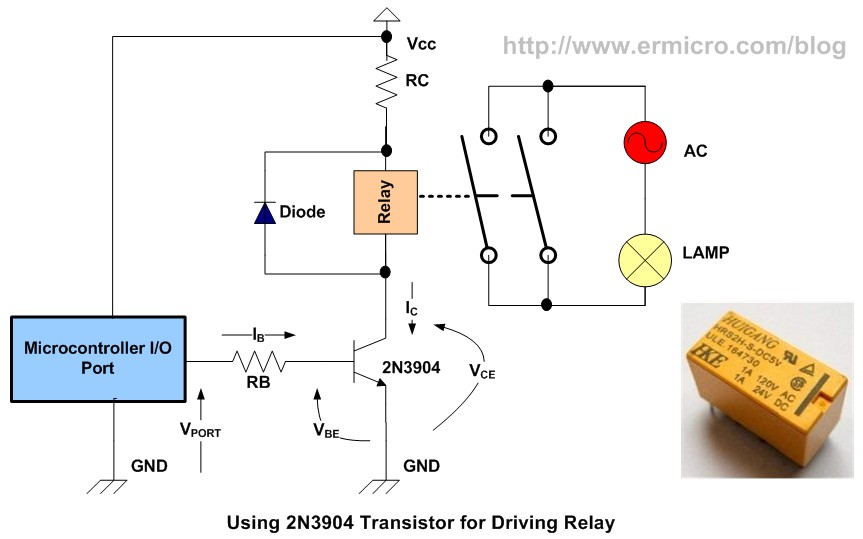
By using 5 Volt power supply and relay with 5 Volt and 60mA operating current:
RC = 0 Ohm (not use, connect relay directly to VCC)
IB = IC / hFE = 0.06 A / 100 = 0.0006 A
RB = (VPORT – VBE) / IB = (4.2 – 0.7) / 0.0006 = 5833.33 Ohm, use 5K6 Ohm resistor
P = (VPORT – VBE) x IB = (4.2 – 0.7) x 0.0006 = 0.0021 watt, use 0.25 Watt resistor
C. Increasing the Collector Current
What if the load current is more than 1 A, let’s say you want to drive a DC motor? Perhaps you will think to use bigger transistor such as 2N3055 power transistor; unfortunately the big power transistor tends to have small hFE mostly less then 20, so it’s mean we have to supply bigger base current. We know that most microcontrollers I/O port can only supply a current up to 20mA, therefore by using this type of transistor the maximum current that we could achieve in the collector terminal is about 400mA; which is far bellow our expectation. The solution for this situation is to use what known as Darlington pair circuit:
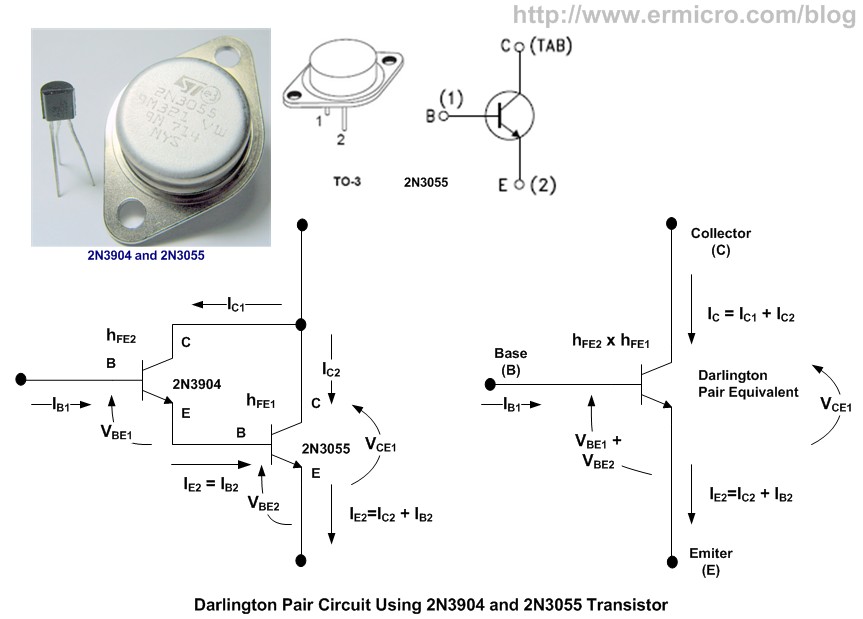
By using the Darlington pair circuit we could combine two transistors; one with high hFE2 factor usually has a low collector current and the one with high collector current usually has a lowhFE1factor. This will give you a total hFE of hFE1 x hFE2In the Darlington pair circuits the VBE will be twice the normal transistor saturated voltage which is about 1.4 Volt. One of the popular ready made Darlington pair transistors on the market are TIP120 (NPN type) and TIP125 (PNP type) which could handle the collector current up to 3 A (max 5 A), and has the hFE minimum of 1000.
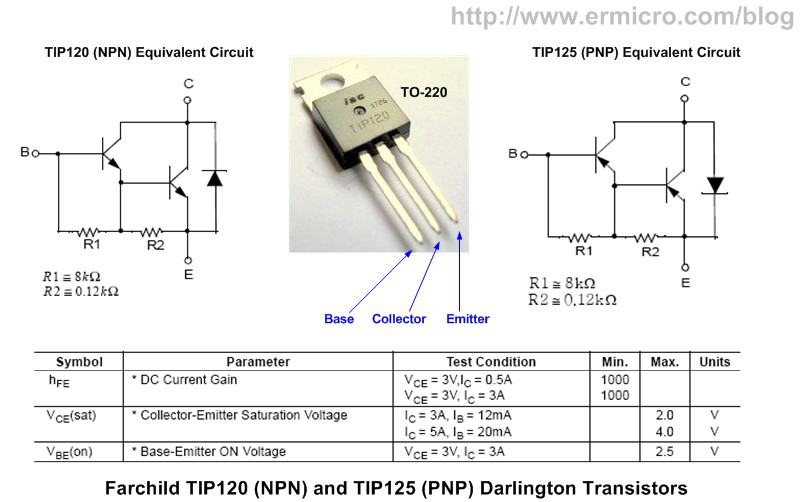
The TIP120 and TIP125 is called a pair Darlington transistors as they have similar characteristic but have an opposite type (i.e. NPN and PNP), this Darlington transistor pair is popular used in motor controller with the H-Bridge circuit. Remember when you use a power transistor to drive a large collector current, you need to supply the transistor with the adequate heat sink to help cooling the transistor by dissipating heat through the heat sink surface into the surrounding air.
Using the same principal we’ve learned before, we could easily calculate the RB value of the DC motor circuit interface bellow:
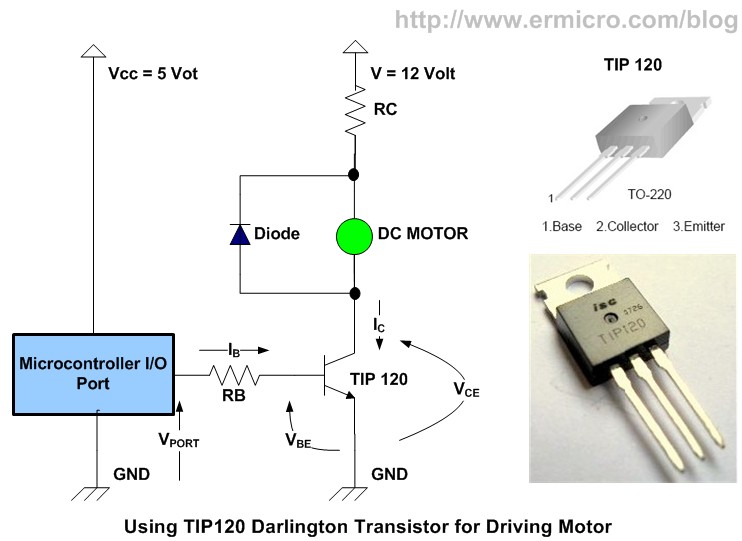
By using 5 Volt power supply and DC Motor with 12 Volt and 1 A maximum operating current:
RC = 0 Ohm (not use, connect directly to the 12 Volt power)
IB = IC / hFE = 1 A / 1000 = 0.001 A
RB = (VPORT – VBE) / IB = (4.2 – 1.4) / 0.001 = 2800 Ohm, use 2K7 Ohm resistor
P = (VPORT – VBE) x IB = (4.2 – 1.4) x 0.001 = 0.0028 watt, use 0.25 Watt resistor
D. The Darlington Transistor Array
For more compact version of the Darlington pair transistor you could use the Texas Instrument ULN2803A which is contain 8 Darlington pair transistors with has build in 2K7 base resistor and clamp diode for each Darlington pair transistors. This makes this Darlington transistor array suitable for driving the relay or motor up to 500mA (this is a maximum datasheet value) directly from the microcontroller output.
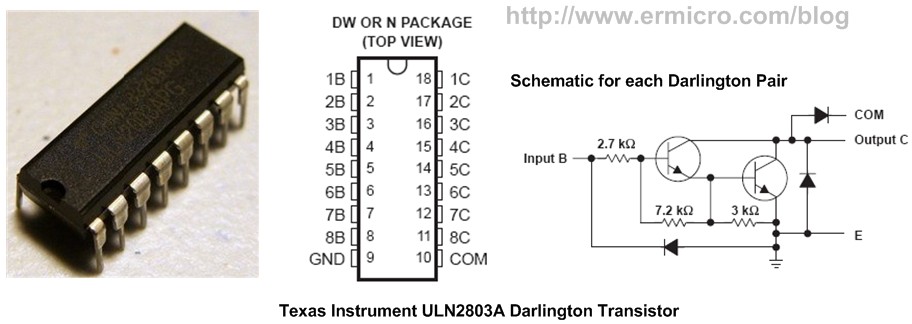
To increase the output current up to 1 A (2 x 500mA, remember this is a maximum datasheet value, for practical application use just half or 2 x 250 mA) you could simply use two Darlington transistor array connected in parallel, the following is the sample circuit for driving two DC motors using the ULN2803A Darlington transistor array:
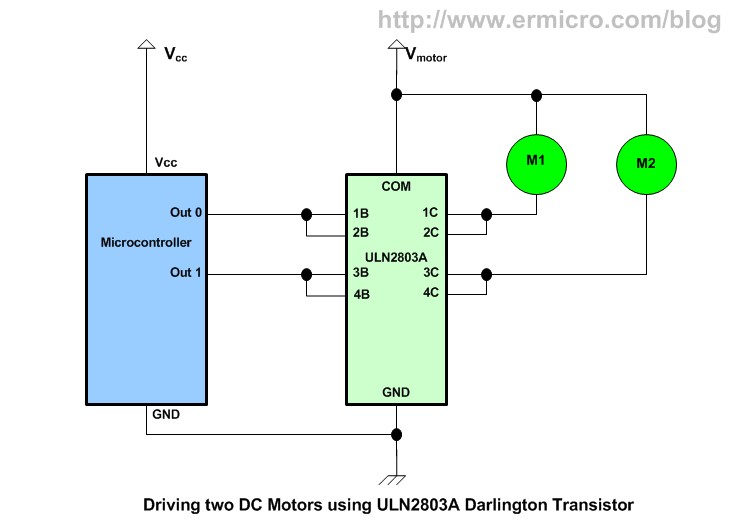
Thanks to the build in internal 2K7 base resistor and the two clamp diode, you don’t need any external component when using ULN2803A to drive the DC motor from your microcontroller port. The Darlington transistor array ULN2803A could be used to drive up to 50 volt voltage load.
E. Isolating your Circuit
Sometimes we need to isolate our microcontroller circuit from the interface circuit especially in the environment that generating a lot of noise which could disturb our microcontroller operation. When we use a relay from the above example, the driver ground is still directly connected to the microcontroller circuit, so there is a change the noises will interfere the microcontroller circuit.
To completely isolate the circuit we could use the optocouplers (also called optoissolator) circuit, this circuit will completely isolate your microcontroller from the interface circuit:
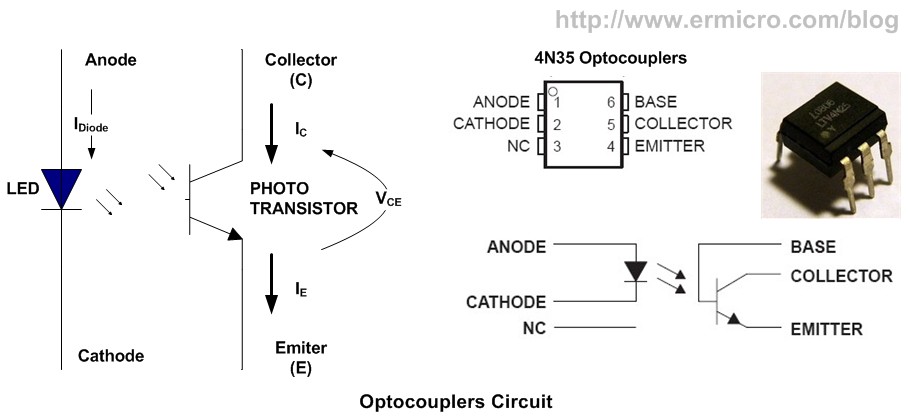
The popular optocouplers circuit available on the market is 4N35 which has the hFE of 500 (in the optocouplers terminology this is also known as the transistor static forward current transfer ratio, Texas Instrument SOES021C, measured with infrared LED current = 0) and maximum collector current of 100mA.
Differ from the ordinary transistor in the optocouplers we don’t use the transistor base terminal for driving the collector current; instead we use the internal infrared LED to transfer the infrared LED light intensity to the phototransitor; based on this infrared LED light intensity the phototransistor will be turned ON or OFF; giving more current to drive this infrared LED will effect more current to flow on the phototransistor collector; This effect is known as the current transfer ratio (CTR). The 100% CTR means that all the current flow on the infrared LED will be transferred 100% to the phototransistor collector.
Therefore by driving the internal infrared LED with 15 mA (in the optocouplers terminology this is also known as the input diode static forward current),  we could assure that the phototransistor will be in the saturate state (ON), because the minimum current to make the phototransitor on is about 10 mA. The following circuit is use optocoupler to interfacing the relay:
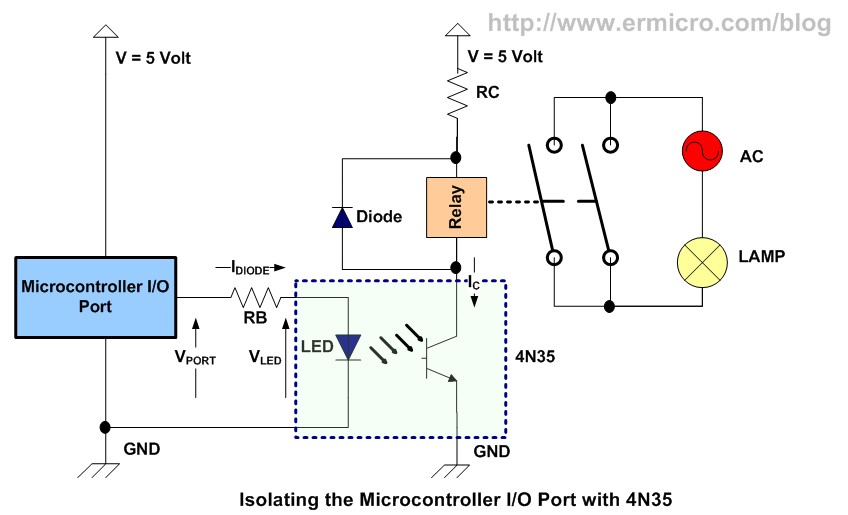
By using 5 Volt power supply and relay with 5 Volt and 60mA operating current:
RC = 0 Ohm (not use, connect relay directly to 5 Volt)
Idiode = 15 mA (0.015 A), VLED = 2 Volt
RB = (VPORT – VLED) / IB = (4.2 – 2) / 0.015 = 146.66 Ohm, use 150 Ohm resistor
P = (VPORT – VLED) x IB = (4.2 – 2) x 0.015 = 0.033 watt, use 0.25 Watt resistor
If you need to drive more current you could use the Darlington pair circuit above or you could use the high gain Darlington optocopuler such as 4N45 (CTR minimum about 350 %).
F. Controlling your DC motor direction
Using just one transistor to control the DC motor as the above example; we only can turn the DC motor in one direction if we want to change the direction than we also have to change the DC motor voltage polarity. The other way to work around this condition is to use the relay to switch the DC motor’s voltage polarity, but using this method means the DC motor will always ON and we can not control the DC motor speed using digital signal or known as the PWM (Pulse Width Modulation).
The best and popular way to solve this issue is to use the H-bridge circuit:
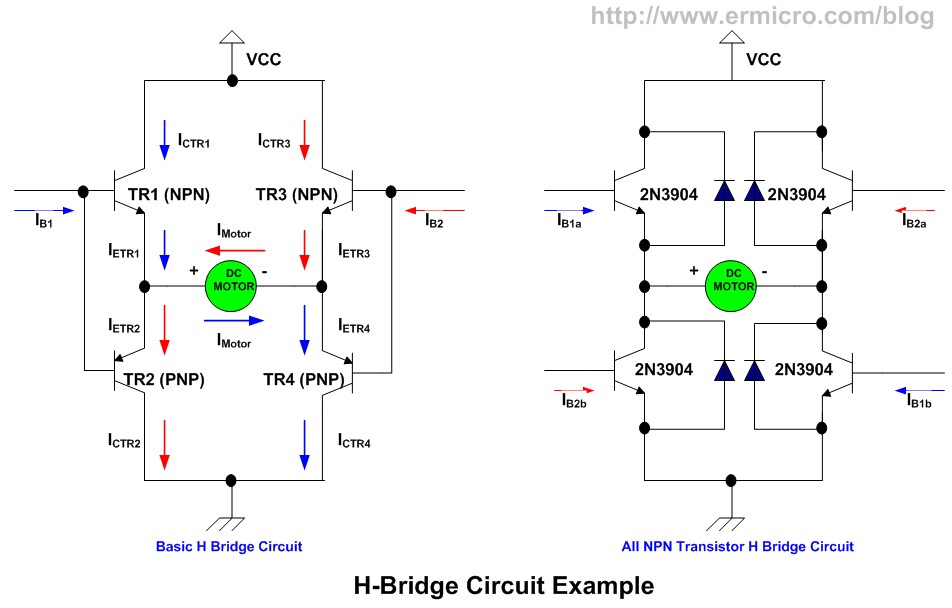
When we apply current (IB1) to the TR1 and TR2 transistors, IB2=0 to the TR3 and TR4 transistors, then TR1 and TR4 transistors will be turned ON, TR2 and TR3 will be turned OFF; this will cause the current to start flow through TR1 transistor, passing the DC motor and going into the TR4 transistor (blue color). When we apply current (IB2) to the TR3 and TR4 transistors, IB1=0 to the TR1 and TR2 transistors, then the TR3 and TR2 transistors will be ON while TR1 and TR4 transistors will be turned OFF; this will cause the current to flow through TR3, passing the DC motor in reverse polarity and going into the TR2 transistor (red color). By not applying current to both IB1 and IB2 all the transistors will be turned OFF.
Again by applying the Ohm’s law we could easily calculate the RB1 and RB2 on this following circuit (Updated! Thanks for the nice discussion and correction from the All About Circuits Forum discussionhere, in order for this circuit to work you have to put a resistor on each of the TIP 120 Darlington transistors base terminal):
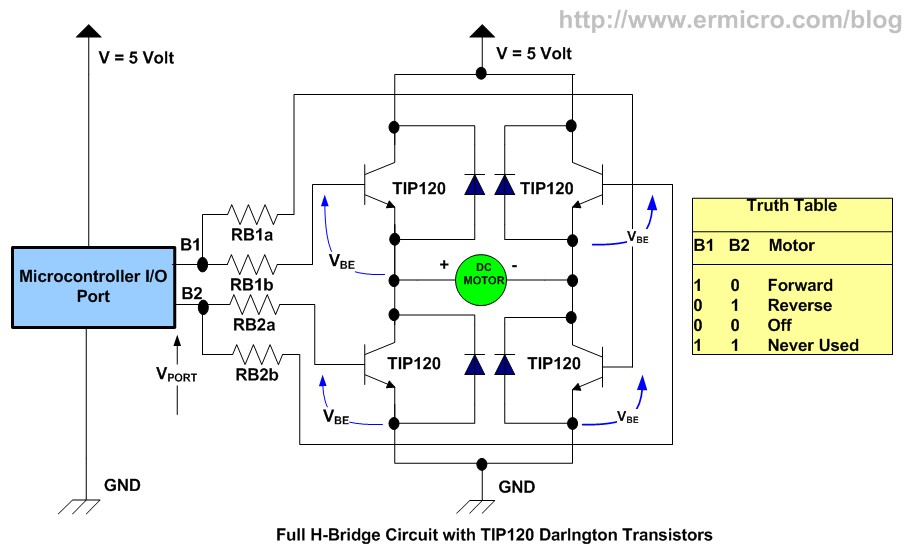
The above H-Bridge circuit use 5 Volt supply and DC motor with 5 Volt and 1 A maximum operating current rating; assuming the TIP120 Darlington transistor hFE is 1000, the RB1 and RB2 resistors could be calculated as follow:
IB = IC / hFE = 1 A / 1000 = 0.001 A, for each of the transistor base current
RB1a,b = (VPORT – VBE) / IB = (4.2 – 1.4) / 0.001 = 2800 Ohm, use 2K2 Ohm resistor
RB2a,b = (VPORT – VBE) / IB = (4.2 – 1.4) / 0.001 = 2800 Ohm, use 2K2 Ohm resistor
P = (VPORT – VBE) x IB = (4.2 – 1.4) x 0.001 = 0.0028 watt, use 0.25 Watt resistor for RB1 andRB2
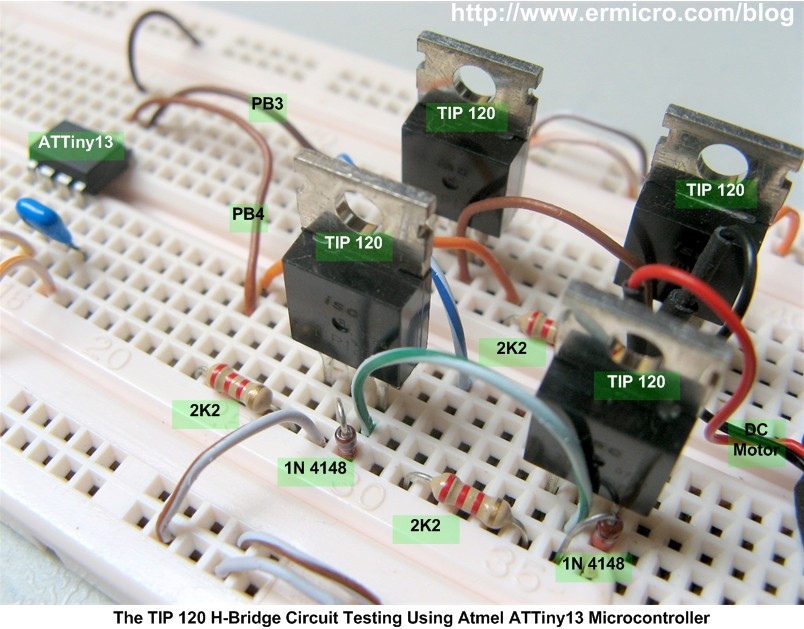
To test the TIP 120 Darlington transistors H-Bridge circuit above I used this following circuit using Atmel AVR ATTiny13 microcontroller as shown on this following picture:
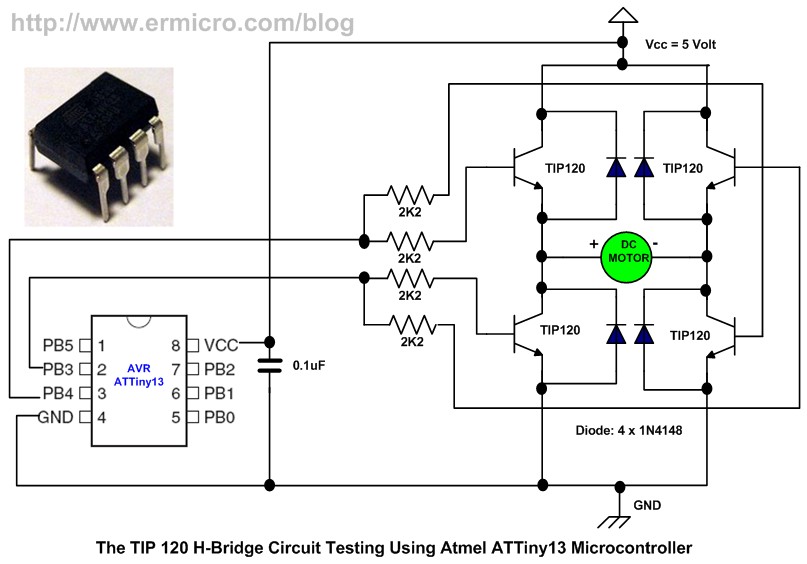
Bellow is the C Program that I used to test this circuit:
//***************************************************************************
//  File Name  : trhbridge.c
//  Version      : 1.0
//  Description. : Transistor as Switch: Simple All TIP120 H-Bridge
//  Author    : RWB
//  Target    : Atmel AVR ATTiny13 Microcontroller
//  Compiler     : AVR-GCC 4.3.2; avr-libc 1.6.2 (WinAVR 20090313)
//  IDE          : Atmel AVR Studio 4.17
//  Programmer   : Atmel AVRISPmkII
//  Last Updated : 18 June 2010
//***************************************************************************
#include <avr/io.h>
#include <util/delay.h>
int main(void)
{
   // Initial I/O
   DDRB |= (1<<PB3)|(1<<PB4); // Set PB3,PB4 as Output, Others as Input
   PORTB &= ~(1<<PB3);        // Reset PB3 (OFF)
   PORTB &= ~(1<<PB3);        // Reset PB4 (OFF)

   for(;;) {                  // Loop Forever
     PORTB |= (1<<PB3);       // Turn ON PB3
     _delay_ms(3000);         // Delay 3 Second
     PORTB &= ~(1<<PB3);      // Turn OFF PB3
     _delay_ms(2000);         // Delay 2 Second
     PORTB |= (1<<PB4);       // Turn ON PB4
     _delay_ms(3000);         // Delay 3 Second
     PORTB &= ~(1<<PB4);      // Turn OFF PB4
     _delay_ms(2000);         // Delay 2 Second
   }
   return 0;               // Standard Return Code
}
/* EOF: trhbridge.c */
One of the advantage using all NPN transistors in the H bridge circuit is the NPN transistor tends to have faster turn on time comparing to the PNP transistor, beside by using the same transistor type we could have similar transistor characteristic in the circuit. You could read more example of using all NPN transistor H-Bridge in “H-Bridge Microchip PIC Microcontroller PWM Motor Controller” on this blog.
Actually most of the modern H-Bridge circuit design for higher voltage (e.g. more than 9 volt) is rarely use the BJT anymore; instead we use the MOSFET because MOSFET is more efficient on higher voltage (i.e. less power dissipation) compare to the ordinary BJT. The other advantage of using MOSFET is that it has very high input impedance, therefore we could easily connect parallel a couple of the same MOSFET to achieve the higher current output and at the same time we could decrease the output resistance of the MOSFET (Rds), which mean we could get more lower power dissipation as shown on this following picture:
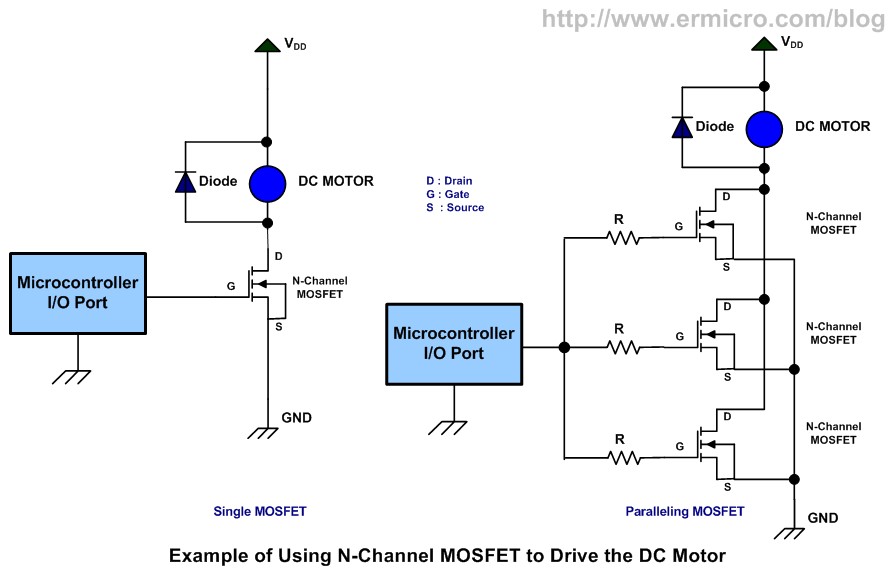
The “The Line Follower Robot with Texas Instruments 16-Bit MSP430G2231 Microcontroller” article is a good example of how we use the N-Channel MOSFET to control the DC motor.
Driving the Stepper Motor
One type of the brushless electric motor that is designed specifically for digital signal input is called the stepper motor. The stepper motor usually is used when we need to control the precise rotation movement and speed with the open loop control. These advantages make the stepper motor is widely found in many applications such as printers, scanners, disk drives, automotives, CNC machines, toys, and many more.
Today the most common used stepper motor types are Unipolar Stepper Motor and Bipolar Stepper Motor. The unipolar stepper motor usually has two windings with a center tap on each of windings, therefore the current could move from the center tap either to the left winding or to the right winding. Usually the unipolar stepper motor comes with 5 or 6 terminal leads. On the other hands the bipolar stepper motor actually is similar to the unipolar type but without the center tap.

Therefore the unipolar stepper motor has advantage of more simple driving circuit over the bipolar stepper motor but has a torque less than the bipolar motor for the same size. The following circuit uses four BC639 transistors to drive the unipollar stepper using the Atmel AVR ATTiny13 microcontroller to provide the required stepping signal to the unipolar stepper motor:
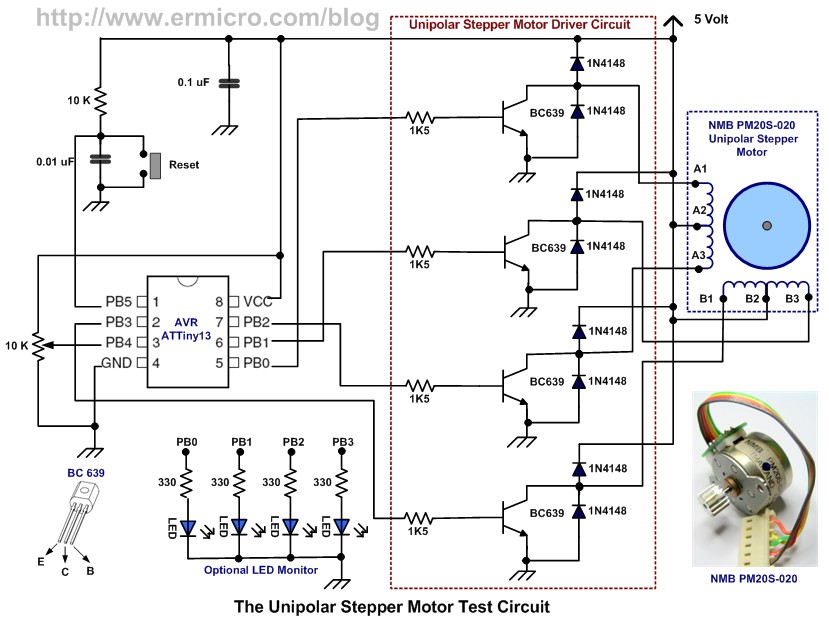
From the schematic above you could see that each transistor is connected to half windings of the unipolar stepper motor phase. You need to experiment with your own stepper motor to get the right windings connection. Assuming maximum 100 mA unipolar stepper motor current on 5 volt supply, and using minimum BC 639 transistor hFE of 40, we could calculate the RB (the base resistors) as follow:
IB = IC / hFE = 100 mA / 40 = 0.0025 A
RB = (VPORT – VBE) / IB = (4.2 – 0.7) / 0.0025 = 1400 Ohm, use 1K5 Ohm resistor
P = (VPORT – VBE) x IB = (4.2 – 0.7) x 0.0025 = 0.0086 watt, use 0.25 watt resistor
Two clamp diodes on each transistor are required because the winding has a center tap. Therefore when one end of winding is high (Vcc) the other end is low (GND) the lower diode will bypass the back EMF (Electromotive Force) voltage that appear on BC 639 transistor collector and emitter terminals.
This following is the C code is used for testing the circuit above:
//***************************************************************************
//  File Name   : upstepper.c
//  Version       : 1.0
//  Description.  : Transistor as Switch: Simple Unipolar Stepper
//                  Motor Driver - Full Step Method
//  Author     : RWB
//  Target     : ATTiny13
//  Compiler      : AVR-GCC 4.3.2; avr-libc 1.6.2 (WinAVR 20090313)
//  IDE           : Atmel AVR Studio 4.17
//  Programmer    : Atmel AVRISPmkII
//  Last Updated  : 03 Nov 2010
//***************************************************************************
#include <avr/io.h>
#include <util/delay.h>
#include <avr/interrupt.h>
// Unipolar Stepper Motor CW/CCW Stepping Sequence
#define MAX_STEP 4
unsigned char cwstep_seq[MAX_STEP]= {0b00000110,
                                     0b00000011,
         0b00001001,
         0b00001100};
unsigned char ccwstep_seq[MAX_STEP]= {0b00001100,
                                      0b00001001,
          0b00000011,
          0b00000110};
volatile unsigned char step_index;
volatile unsigned int ovftimes;
volatile unsigned char status;
ISR(TIM0_OVF_vect)
{
  static unsigned int count=1;
  count++;
  if (count >= ovftimes) {
    cli();                      // Disable Interrupt
    // Stepping Output
    if (status)
      PORTB = ccwstep_seq[step_index++];
    else
      PORTB = cwstep_seq[step_index++];
    if (step_index >= MAX_STEP)
      step_index=0;
    count=0;                    // Reset Count
    TCNT0=0;                    // Start counter from 0
    sei();                      // Enable Interrupt
  }
}
int main(void)
{
   // Initial I/O
   DDRB = 0b00001111;        // Set PB0, PB1, PB2, and PB3 as Output, Others as Input
   PORTB = 0b00000000;       // Reset PORTB Output
   // Set ADCSRA Register on ATTiny13
   ADCSRA = (1<<ADEN) | (1<<ADPS2) | (1<<ADPS1);
   ADCSRB = 0b00000000;
   // Set ADMUX to PB4 (ADC2)
   ADMUX=0b00000010;
   // Disable Digital Input on PB4 (ADC2)
   DIDR0=0b00001000;
   // Initial TIMER0
   TCCR0A=0b00000000;        // Timer/Counter 0 Normal Operation
   TCCR0B=(1<<CS01);         // Use prescaller: Clk/8 with 9.6 MHz Internal Clock
   TCNT0=0;                  // Start counter from 0
   TIMSK0=(1<<TOIE0);        // Enable Counter Overflow Interrupt
   step_index=0;
   ovftimes=10;
   status=0;                 // 0 - CW, 1 - CCW
   sei();                    // Enable Interrupt

   for(;;) {                 // Loop Forever
     // Start conversion by setting ADSC on ADCSRA Register
     ADCSRA |= (1<<ADSC);
     // wait until convertion complete ADSC=0 -> Complete
     while (ADCSRA & (1<<ADSC));
     // Get the ADC Result
     ovftimes = ADCW;
     if (ovftimes > 800)
       status^=0x01;        // Toggle the Direction

     _delay_ms(50);
   }
   return 0;             // Standard Return Code
}
/* EOF: upstepper.c */
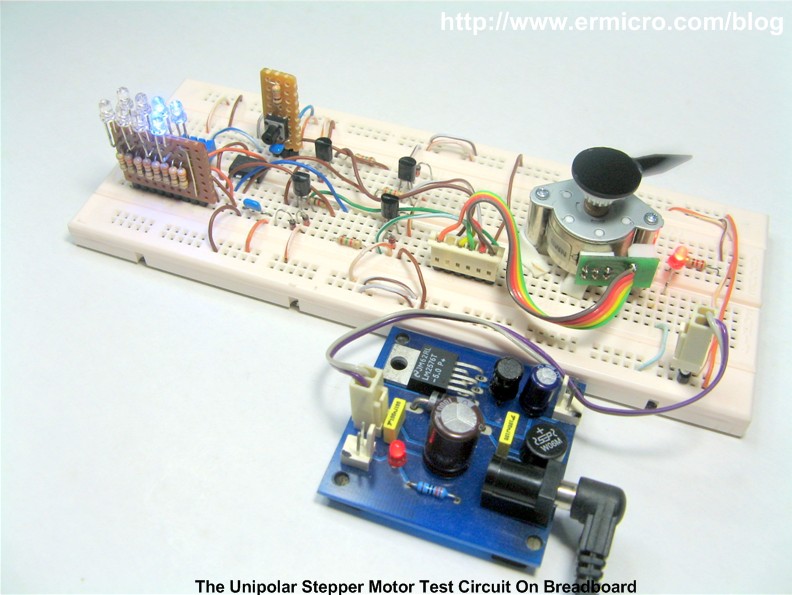
The method to rotate this unipolar stepper motor rotor is known as the full step mode method; in full step mode we always excite two windings at the same time, with the right current sequence we could rotate the stepper motor in 4 repeatable steps. Reversing the step sequences will make the stepper motor to turn into opposite direction. In this tutorial I used NMB-PM20S-020 permanent magnet motor where the step required is shown on this following diagram:
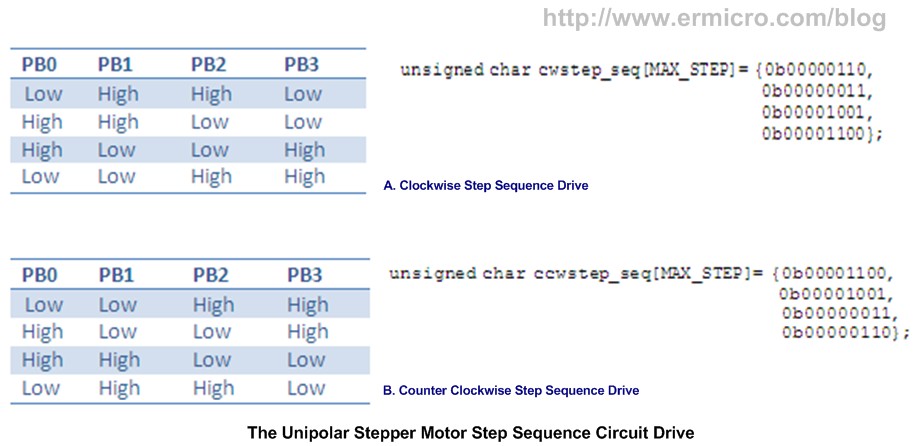
You could easily adapt the step sequence to your own unipolar stepper motor by changing both thecwstep_seq (clockwise rotation) and ccwstep_seq (counter clockwise rotation) array variables data in the program.
Using the AVR ATTiny13 microcontroller TIMER0 interrupt we could easily supply the required output steps to the stepper motor. I used the ADC (Analog to Digital Conversion) to control the stepper motor step sequence delay as well as to change the rotation direction by adjusting the 10K trimport. For more information about AVR ADC and TIMER0 you could read these blog’s articles “Analog to Digital Converter AVR C Programming” and “Working with AVR microcontroller Communication Port Project“.
You could also replace the BC639 transistor with the Darlington pair transistor array such as ULN2803A from Texas Instrument mention above. Using this Darlington pair transistor array make the unipolar stepper circuit become simpler (less components) because it has the required clamp diode on each Darlington transistor pair and you could take advantage of higher current gainer provided by the Darlington pair transistors.
To drive the bipolar stepper motor; each of the two windings will require the H-Bridge circuit similar to the H-Bridge circuit for driving the DC motor mention above. Therefore we need at least 8 transistors to drive the bipolar stepper motor (4 transistors on each windings). By forwarding and reversing the current flow on each winding we could achieve the required steps sequence to drive the bipolar motor.
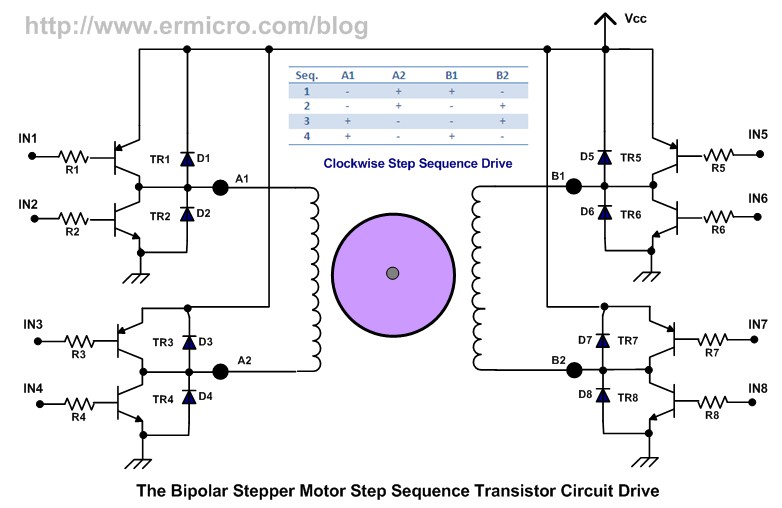
And by supplying the correct steps sequence logic to IN1, IN2, IN3, IN4, IN5, IN6, IN7, and IN8input from the microcontroller output port we could make this bipolar stepper motor to rotate. The opposite direction (counter clockwise) rotation could be achieved by reversing the steps sequence (i.e. 4, 3, 2, and 1).
Using Transistor as switch Testing Circuit Video
1. This following video show you of how to drive a transistor which connected with 5 red LED using the Atmel AVR ATTiny25 microcontroller.
2. The TIP120 H-Bridge Testing Circuit video using Atmel ATTiny13 Microcontroller:
3. The Unipolar Stepper Motor Testing Circuit video using Atmel ATTiny13 Microcontroller:

Bookmarks and Share

The LM324 Quad Op-Amp Line Follower Robot with Pulse Width Modulation

The LM324 Quad Op-Amp Line Follower Robot with Pulse Width Modulation

 源自於 http://www.ermicro.com/blog/?p=1908

Designing a simple and yet functional Line Follower Robot (LFR) is always a fascinating and challenging subject to be learned, the LFR actually could be implemented in many ways start from a simple two transistors to a sophisticated PID (Proportional, Integrate and Differential) which take advantage of the programmable feature of microcontroller to calculate the PID equation to successfully navigate the black track line on a white background surface.
Designing a non microcontroller based LFR is quite challenging tasks as we need to limit the electronic components numbers so the LFR will not too complicated to be built by most average robotics beginners or electronic hobbyists, but at the same time we need to have a good speed control mechanism in order for the LFR to navigate the black track line successfully. The microcontroller based design LFR in the other hand is a popular choice because it reduces a number of electronic components significantly while still providing a flexible programmable control to the LFR.
On this tutorial we are going to build yet another LFR using just the standard analog components easily found on the market but use the same speed control method technique found in many good microcontroller based Line Follower Robot design. As the result we could get a good precision analog line follower robot that comparable to the microcontroller based Line Follower Robot design. On this tutorial you will also learn many useful information of how to use the operational amplifier.
The Line Follower Robot
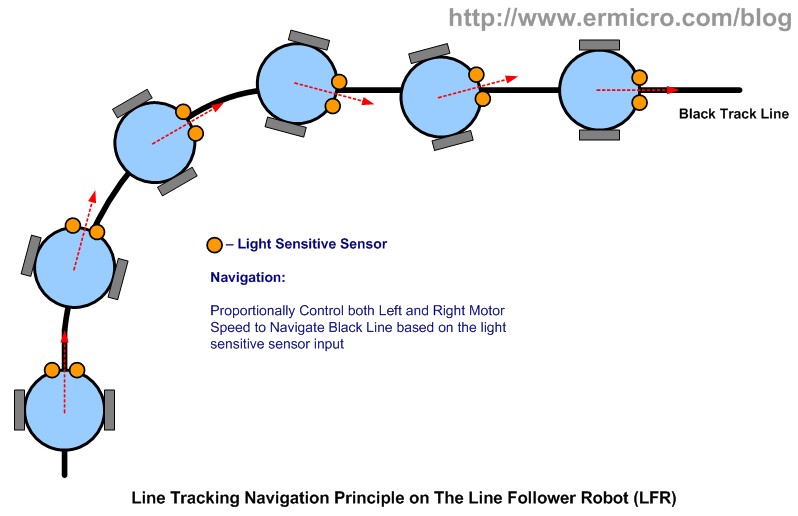
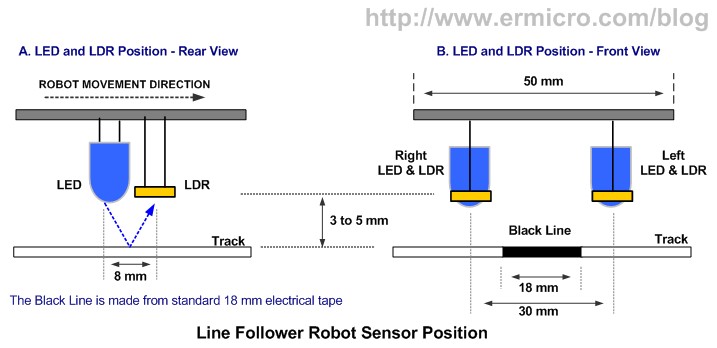
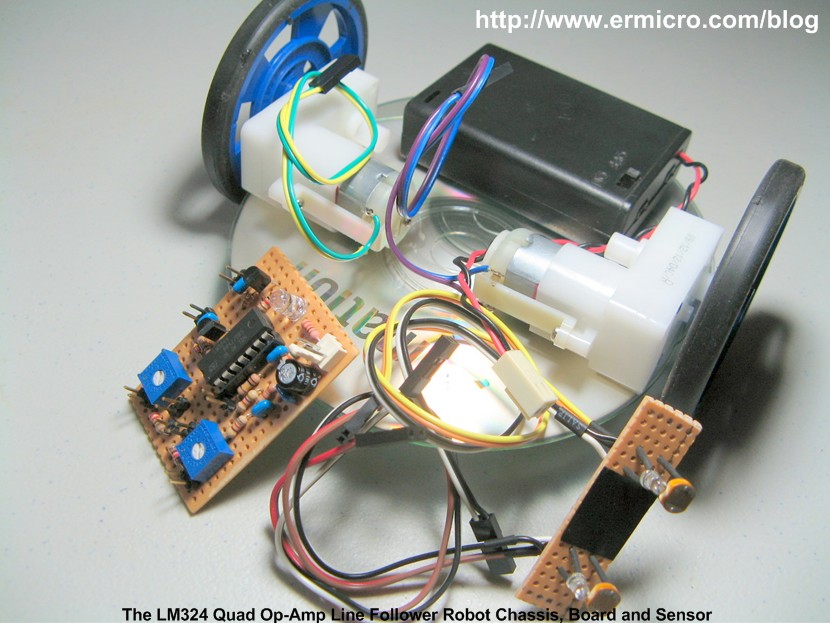
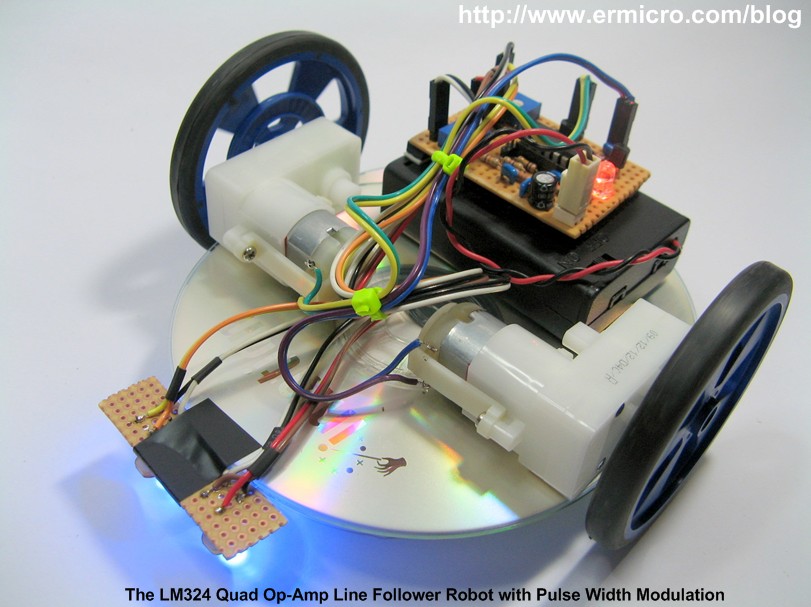
This Line Follower Robot basically use a Cadmium Sulphide (CdS) photocell sensor or known as Light Dependent Resistor (LDR) and the high intensity blue Light Emitting Diode (LED) to illuminate the area under the photocell sensor to sense the black track line and the DC motor speed control technique to navigate the black line track as shown on this following picture:
The easy method to navigate the black track line is to turn ON and OFF the left or the right DC motor according to the sensor reading (black turn OFF and white turn ON), but using this method will make the LFR to move in zigzag way. By proportionally control both left and right DC motor speed according to the light intensity level received by the photocell sensor (reflected back by the black track line) we could make the LFR easily navigate this track. The common technique to control the motor speed efficiently is to use a pulse signal known as the pulse width modulation or PWM for short.
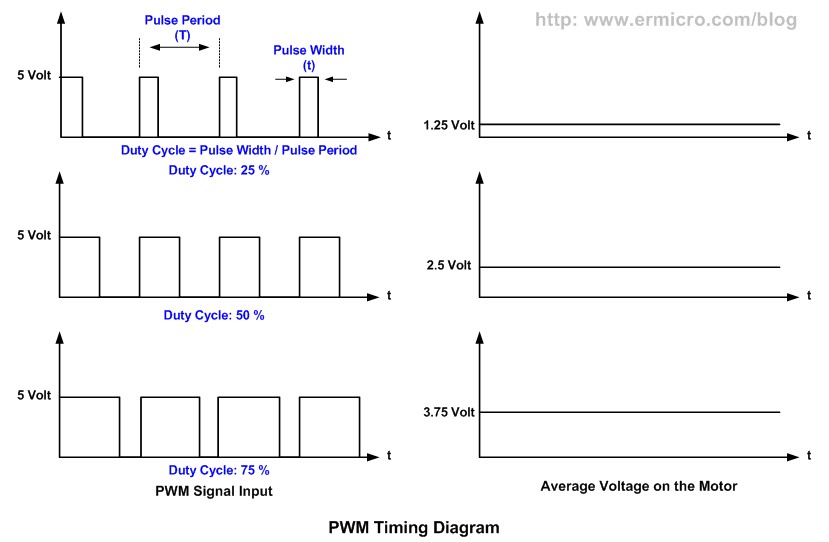
PWM basically is an ON and OFF pulse signal with a constant period or frequency. The proportion of pulse ON time to the pulse period is called a “duty cycle” and it expressed in percentage. For example if the proportion of pulse ON time is 50% to the total pulse period than we say that the PWM duty cycle is 50%. The PWM duty cycle percentage is corresponding to the average power produced by the pulse signal; the lower percentage produces less power than the higher percentage.
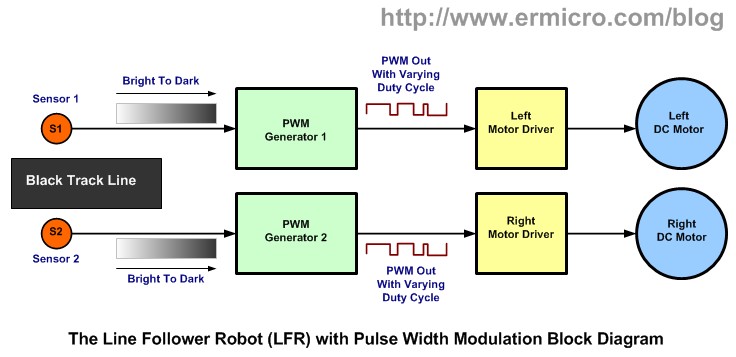
Therefore by changing the PWM duty cycles we could change the average voltage across the DC motor terminals, this mean we could vary the DC motor speed just by changing the PWM duty cycle. Therefore to make the LFR smoothly navigate the black track line, we have to adjust the PWM duty cycle according to the photocell sensor reading. The brighter light intensity level received by sensor (sensor is on the white surface) will result in higher PWM duty cycle percentage and the darker light intensity level (sensor is on the black line) received by photocell sensor will result in lower PWM duty cycle percentage.
By converting each of the photocell sensor light intensity level reading to the corresponding voltage level we could achieve this objective by using what is known as the Voltage Control Pulse Width Modulation principal.
Actually generating the PWM signal is easier with microcontroller instead of discrete components because all you have to do is to program the microcontroller PWM peripheral to do the task. On this tutorial we will learn of how to build this LFR with Voltage Control PWM using the same working principal found in many today’s modern microcontroller but using just the analog electronic components.
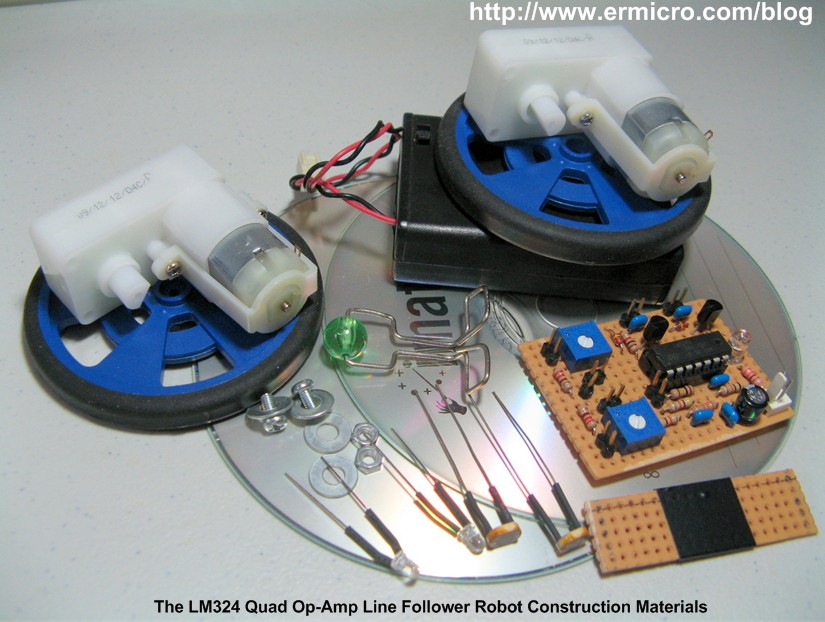
Now let list down the necessary electronic and other supported components to build this awesome LFR:
1. Resistors: 220 (2), 1K (2), 15K (1), 33K (1), 47K (2), and 100K (1)
2. Trimpots: 100K (2)
3. Two Light Dependent Resistor (dark above 100KOhm and below 5KOhm  on bright light intensity)
4. Capacitors: 47uF/16v (1) and 0.1uF (5)
5. Diodes: 1N4148 (2)
6. High Intensity 3 mm blue Light Emitting Diode (2)
7. Optional 5 mm auto flash RGB LED with 330 Ohm resistor for the power indicator
8. Transistors: BC639 (2)
9. IC: National Semiconductor LM324 Quad Operational Amplifier (1)
10. DC Motor: Solarbotics GM2 Geared DC motor with Wheel (2)
11. Prototype Board: 52 x 38 mm for main board and 50 x 15 mm for sensors
12. 3xAA Battery holder
13. CD/DVD ROM (2)
14. Plastic Beads and Paper Clip for the castor (the third wheel)
15. Bolt, Nuts, Double Tape and Standard Electrical Tape for the black line
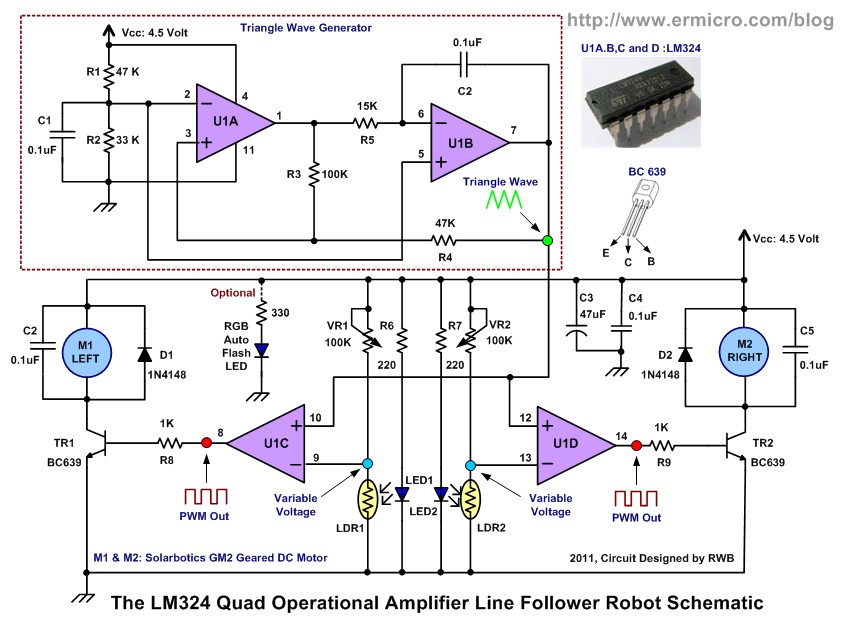
The complete Line Follower Robot electronics schematic is shown on this following picture:
The Voltage Control PWM
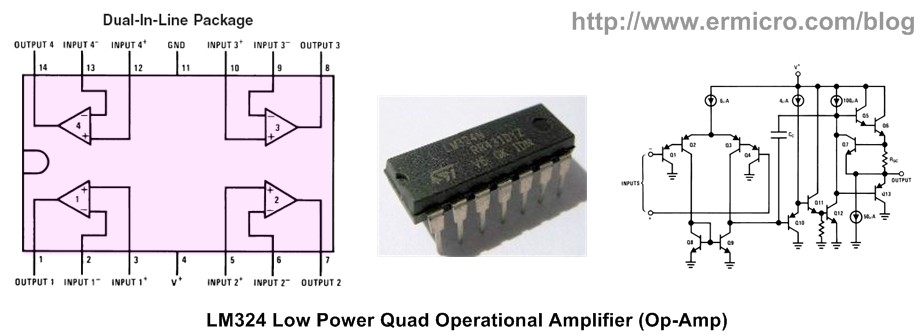
The main brain of this Line Follower Robot is lay behind the LM324 quad operational amplifier from National Semiconductor. The dual in line LM324 packages contains four identical op-amps and is specially designed to operate as an analog device.
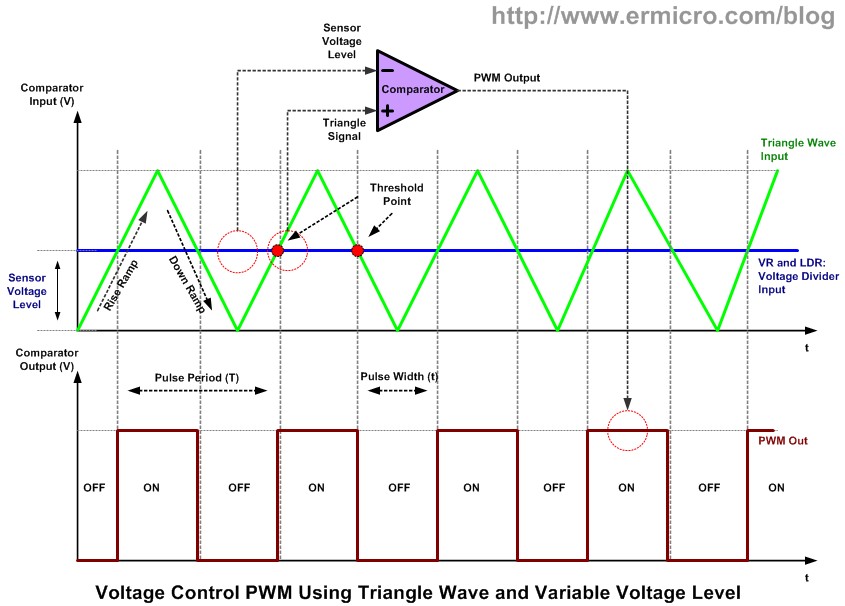
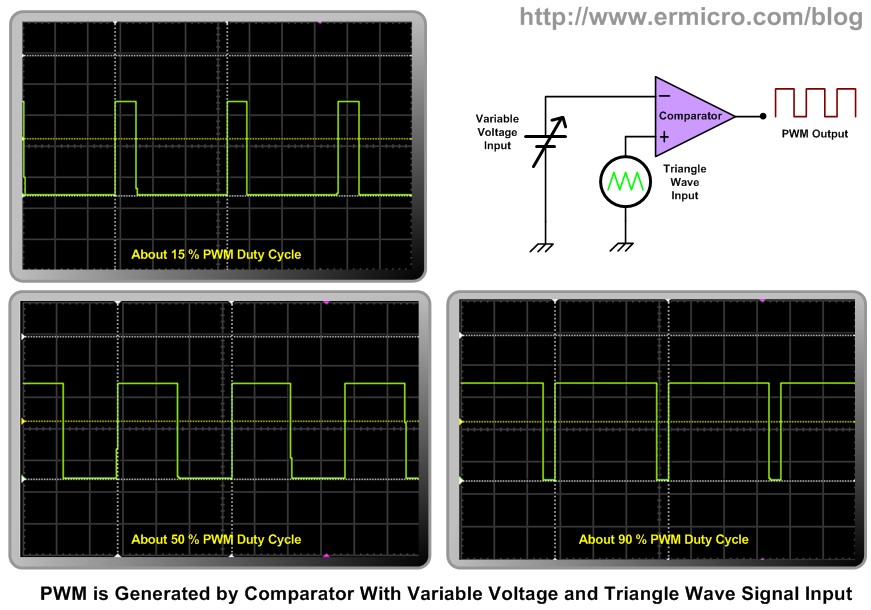
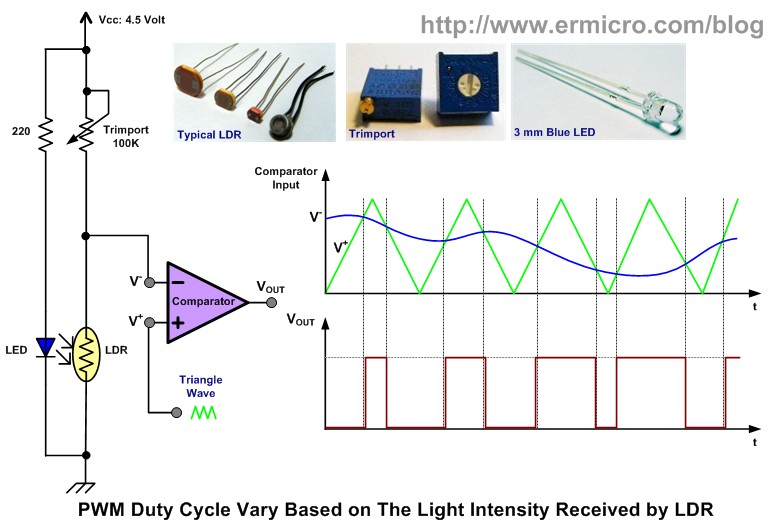
The voltage control PWM could be generated by first using the triangle signal generator which provide the basic PWM pulse frequency and the necessary ramp voltage (rise and down) to produce the PWM signal. Next by continuously comparing this ramp voltage according to the voltage level produced by the photocell sensor using the comparator circuit we could produced the exact voltage control PWM as shown on this following picture.
When the triangle rise ramp signal reaches the voltage threshold point it will turn ON the comparator because the comparator non inverting input (V+) voltage is greater than the comparator inverting input (V-) voltage and when the down ramp signal reaches the voltage threshold point it will turn OFF the comparator because now the comparator inverting input (V-) voltage is greater than the comparator non inverting input (V+) voltage. You could read more about how the comparator works on Working with the Comparator Circuit in this blog.
If we set the threshold point voltage higher, then the ON period will be shorten; and if we set the threshold point voltage lower, then the ON period will be longer. Therefore by varying the threshold point voltage we could also vary the ON and OFF period of the comparator which is the exact behavior that we are looking for to produce the required PWM signal to drive the Line Follower Robot geared DC motor.
The ramp signal is provided by the two op-amps (U1A and U1B) that generate the triangle wave signal while the comparator for producing the PWM to each DC motor is provided by the other two op-amps (U1C and U1D) that receipt its input from the voltage divider circuit (VR and LDR) which provide the voltage threshold point and together with the triangle wave to produce the required PWM pulse
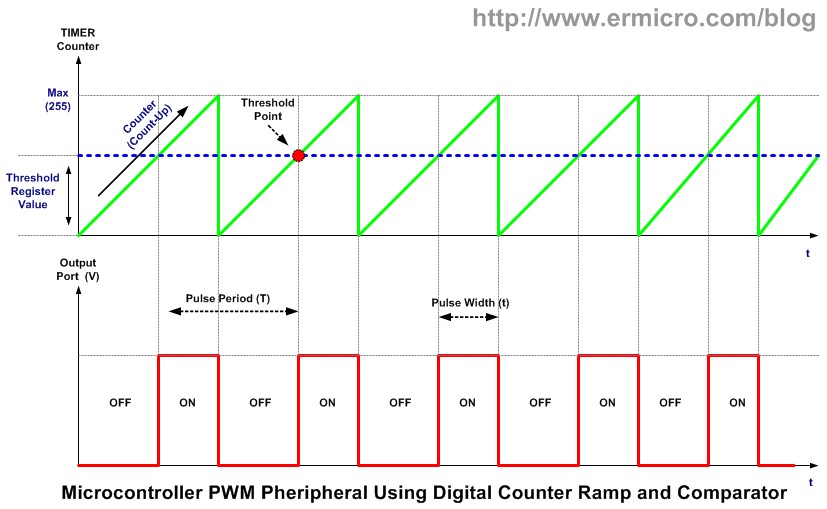
The PWM principal explained above is also used in many today’s modern microcontrollers PWM peripheral; but instead of processing the analog signal it process the digital signal. The ramp signal is replaced by the digital counter (TIMER peripheral) that will count up from 0 to 255 and start from 0 again, while the threshold point voltage is provided by threshold point register that hold the digital value (e.g. 100).
Microcontroller uses the digital comparator to compare these two digital values, when the digital counter counting up and reach the threshold point (i.e. 100) then the PWM peripheral will turn on to the output port and when it reach the maximum value (i.e. 255) it will turn off to the output port. Therefore by changing the threshold point register value we could change the PWM duty cycle output. You could read more about microcontroller based PWM on H-Bridge Microchip PIC Microcontroller PWM Motor Controller and Introduction to AVR Microcontroller Pulse Width Modulation (PWM) articles on this blog.
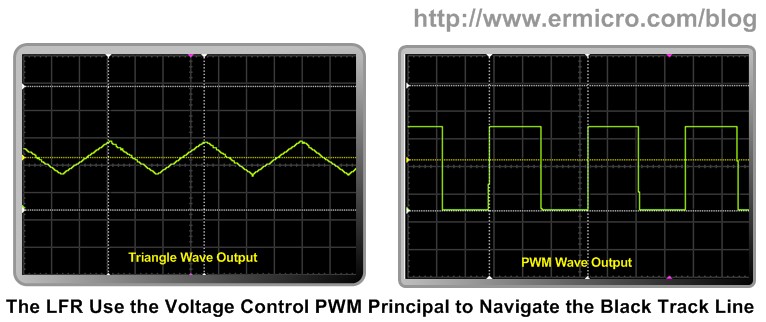
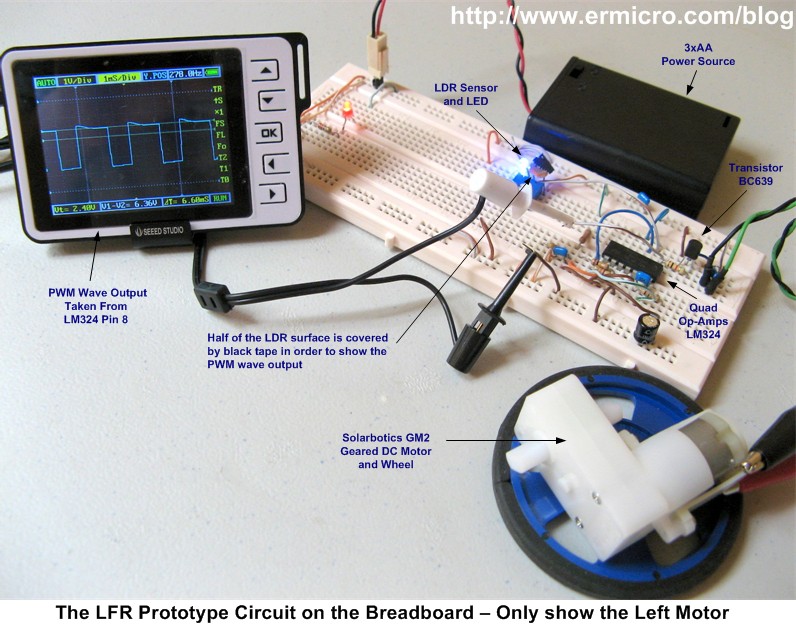
When designing the electronic circuit is a good habit to prototype it first, the prototype circuit enables us to fine tune the electronics design and give us the picture (signal wave) of how the circuit really works. The following picture is the Line Follower Robot circuit prototype on a breadboard complete with sensor (LED and LDR pairs) and the GM2 geared DC motor from Solarbotics.

The Triangle Wave Generator Circuit
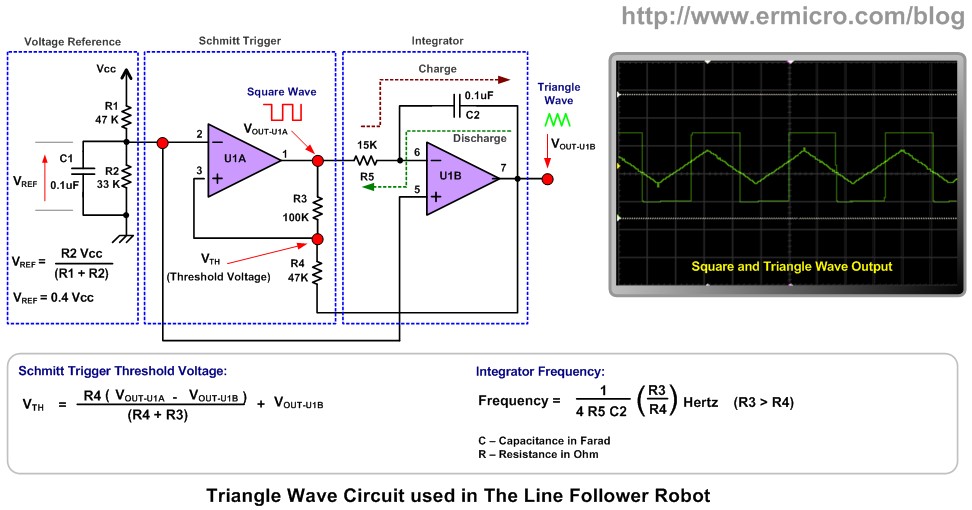
Now as you understand the principal of how the Line Follower Circuit works than let’s take a look at the triangle wave generator circuit. In order to make it easy to understand I redraw the electronic schematic circuit separately as shown on this following picture:
To generate the triangle wave we need to use the Schmitt Trigger circuit (also called a comparator with hysteresis) that act as ON and OFF switch to the Integrator circuit input. The integrator uses the R5 and C2 to produce the necessary triangle linear ramp (up and down) on its output.
When the power up we assume the U1A output is HIGH (Vcc); the C2 capacitor will start to charge through the R5 resistor. Because the R5 and C2 is connected to the U1B inverting input (V-), therefore the U1B output will start to ramp down. The U1A non inverting input (V+) get the positive feedback from R3 and R4, when the U1B output voltage reach the threshold voltage below Vref than it will turn the U1A output to LOW (0). This bottom threshold voltage could be calculated as follow:
Vth = (R4 (Vout-u1a – Vout-u1b) / (R4 + R3)) + Vou-u1b; Vout-u1a = Vcc; Vcc = 4.5 Volt
Vth <= Vref, Vref = 0.4 Vcc
(R4 (Vcc – Vout-u1b) / (R4 + R3)) + Vout-u1b <= 0.4 Vcc
Now putting all the resistors value then we will get this following result:
(47 (Vcc – Vout-u1b)/ 147) + Vout-u1b <= 0.4 Vcc
1.4 – 0.3 Vout-u1b + Vout-u1b <= 1.8
Vout-u1b <= 0.6 Volt
Therefore the U1B output will ramp down to about 0.6 volt than the U1A output will turn OFF. Next the C2 capacitor will discharge through R5 and the UA1B output will start to ramp up and it start to increase the voltage across the R4 (Vth – threshold voltage) until the Vth voltage above the Vref voltage then the U1A output will turn to HIGH and the whole cycle will repeat again. This upper threshold voltage could be calculated as follow:
Vth = (R4 (Vout-u1a – Vout-u1b) / (R4 + R3)) + Vou-u1b; Vout-u1a = 0; Vcc = 4.5 Volt
Vth >= Vref; Vref = 0.4 Vcc
(R4 (- Vout-u1b) / (R4 + R3)) + Vout-u1b >= 0.4 Vcc
Now putting all the resistors value then we will get this following result:
(47 (- Vout-u1b)/ 147) + Vout-u1b >= 0.4 Vcc
- 0.3 Vout-u1b + Vout-u1b >= 1.8
Vout-u1b >= 2.6 Volt
Therefore the triangle voltage will ramp up from 0.6 volt to 2.6 volt then ramp down to 0.6 volt repeatedly. The frequency of the triangle wave could be calculated as follow:
Frequency = (1 / (4 x R5 x C2)) x (R3/R4) Hertz
Now putting all the resistors and capacitor value then we will get this following result:
Frequency = (1 / (4 x 15,000 x 0.0000001)) x (100,000/47,000) = 354.61 Hz
As you might guess the actual frequency measured on this Line Follower Robot prototype circuit above is about 292 Hz, this is due to the electronic components tolerance value (resistors and capacitors). Therefore if you want to have the exact frequency you could put a 100K trimport in series with R5 resistors. The voltage divider R1 and R2 provide the voltage reference (DC bias voltage) to both U1A and U1B op-amps.
The Sensor Circuit
As mention above this Line Follower Robot take advantage of the photo-resistor (CdS) known as Light Dependent Resistor (LDR). The LDR will decreases its resistance in the presence of light and increase its resistance in the dark. The region under the LDR is illuminate with a high intensity blue LED, the white surface will reflect most of the light to the LDR surface while the black track line will absorb most of the light, therefore less light will reflect to the LDR surface.
As the robot move on the black track line the LDR will continuously capture the reflected light and convert this light intensity into the corresponding voltage and feeding it to the inverting input (V-) of U1C (left sensor) and U1D (right sensor).
The 100K trimpot and LDR basically is the voltage divider circuit when the LDR detect the black track line it will receive less light intensity (LDR resistance increase) and the voltage (V-) will increase; this will decrease the PWM duty cycle output and as the result the geared DC motor will turn slowly or stop. When the LDR on the white surface it will receive maximum light intensity (LDR resistance decrease) and the voltage (V-) will decrease; this will increase the PWM duty cycle output and as the result the geared DC motor will turn fast.
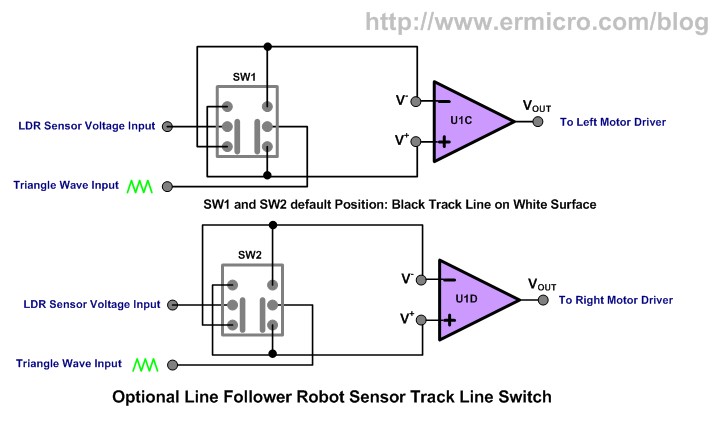
You could simply exchange the comparator V+ and V- input source to make the Line Follower Robot detect the white line on the black surface instead of normal black line on the white surface. By using two DPDT (Double Pole Double Throw) switches you could achieve this behavior as shown on this following picture:
The geared DC motor driver uses the BC639 transistor and the base terminal is connected to the comparator output through the 1K resistor. The transistor is operated as a switch which turns ON and OFF the geared DC motor according to the PWM pulse current it received from the comparator. The 0.1uF capacitor across the geared DC motor’s terminal is used to reduce noise generated by the DC motor. For more information about using transistor as switch you could read Using Transistor as Switch article on this blog.
The Line Follower Robot Construction
The Line Follower Robot construction could be constructed freely but the easiest one is to use the discarded CD/DVD ROM as shown on this following pictures:
I glue the two CDROM together in order to make more room and attached the two DC motors, 3xAA battery holder, main board and sensor board using the double tape. The sensor sensitivities and the Line Follower Robot speed could be controlled by adjusting the 100K trimport. After putting all the parts together now is time to watch how this nice Line Follower Robot in action:
The Final Thought
As you’ve seen from the demo video above this Line Follower Robot design is capable to handle and smoothly navigate a quite complex black track line. This prove that a good analog Line Follower Robot design sometimes could outperform many microcontrollers based Line Follower Robot.
Building the Line Follower Robot (LFR) is one of my favorite projects as I enjoy designing and making this kind of robot, it also gives much joy and fun to my kids as well. I hope this project will give you as much joy as I did; building, watching, and playing with this analog Line Follower Robot.

Bookmarks and Share

Working with the Comparator Circuit

Working with the Comparator Circuit

源自於  http://www.ermicro.com/blog/?p=1578
Sometimes in the embedded system world we need to process the analog world and sending the signal to the microcontroller when the analog signal exceed some predetermine limit we’ve set. Some example of this situation is to send the interrupt signal to the microcontroller operation when the temperature is already exceeds certain limit or the light intensity exceeds certain bright level. This is when the comparator circuit becomes handy as it’s designed specially for this purpose.
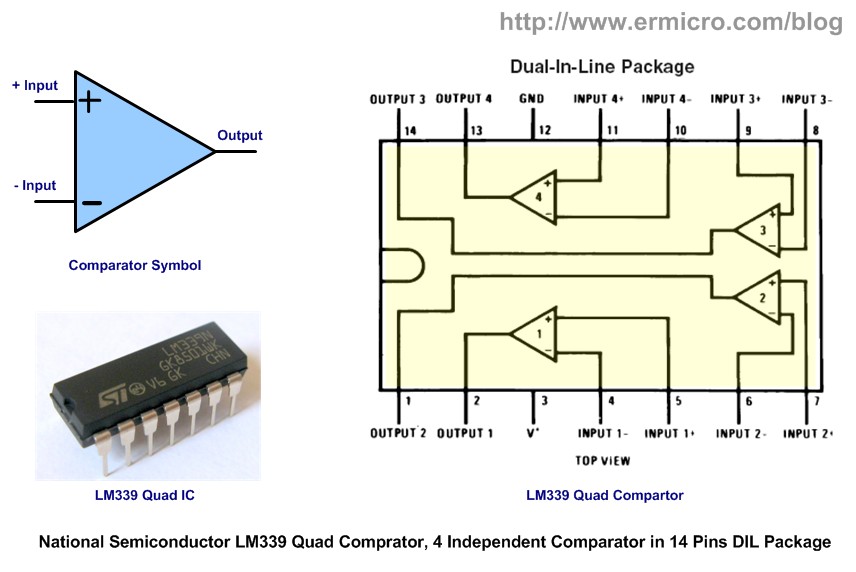
Today the modern comparator is easily found in the form of integrated circuit such as the popular National Semiconductor LM339 quad (four) comparator 14 pins dual in line (DIL) package bellow:

When you look closely to the comparator symbol, some of you will recognize it as the Op-Amp (Operational Amplifier) symbol, so what make this comparator differ from its big brother; Op-Amps is designed to accept the analog signal and outputting the analog signal while the comparator only outputting the digital signal; although the ordinary Op-Amp could be used as the comparator such as the popular National Semiconductor LM324 quad Op-Amps, but the real comparator is designed to have a faster switching time comparing to the multipurpose Op-Amps. Therefore you could say that the comparator is the modified version of the Op-Amps which specially designed to give the digital output.
1. Basic Comparator Circuit
The comparator circuit work by simply taking two analog inputs, comparing them and produce the logical output high “1” or low “0“.
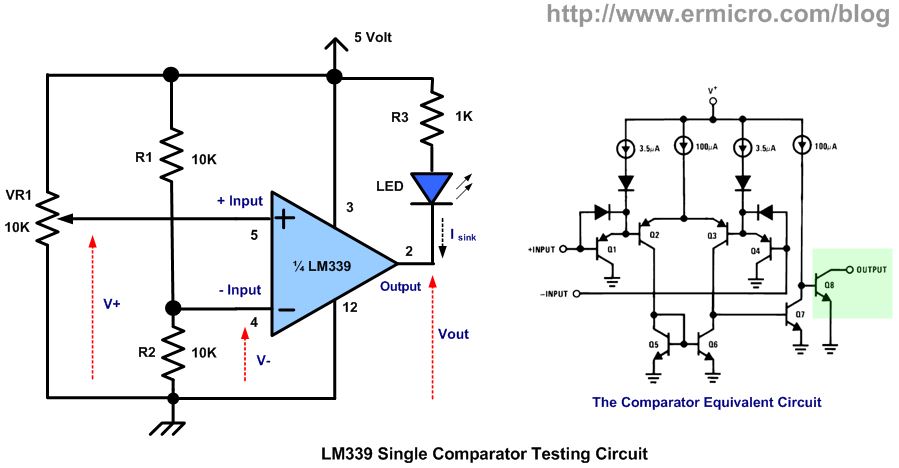
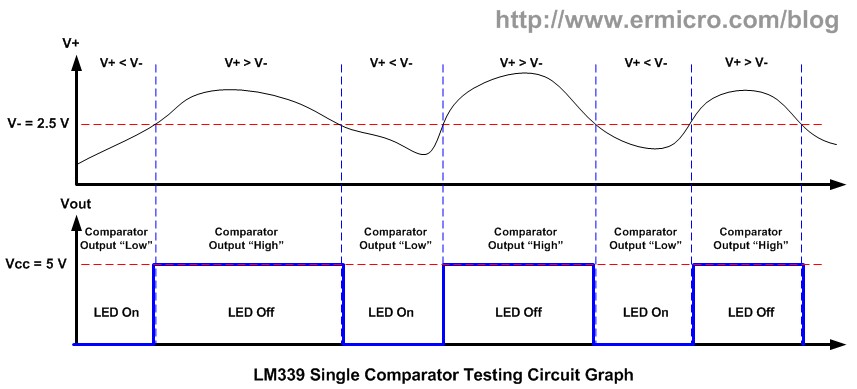
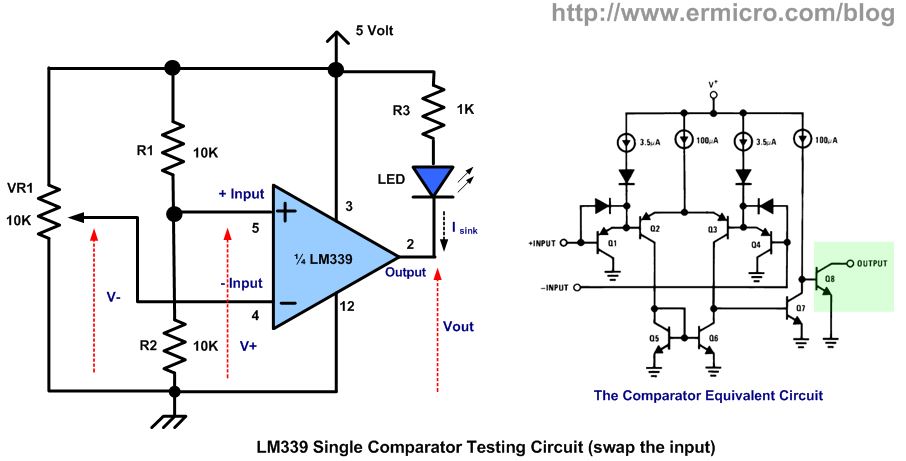
By applying the analog signal to the comparator + input called “non-inverting” and - input called “inverting“, the comparator circuit will compared this two analog signal, if the analog input on + input is greater than the analog input on - input (inverting) then the output will swing to the logical “1” and this will make the open collector transistor Q8 on the LM339 equivalent circuit above to turn ON. When the analog input on + input (non inverting) is less than the analog input on - input(inverting) then the comparator output will swing to the logical “0” (the Q8 transistor turn OFF). Furthermore on this tutorial, I will use the term non-inverting and inverting instead of + inputand - input on the comparator analog input.
As you’ve seen from the LM339 equivalent circuit picture above, the LM339 use an open collector transistor Q8 for its output, therefore we have to use what is called “pull-up” resistor connected to the Q8 collector lead with the Vcc in order to make this Q8 transistor work. The maximum current that could flow on this Q8 transistor (output sink current) according to the LM339 datasheet is about 18 mA.
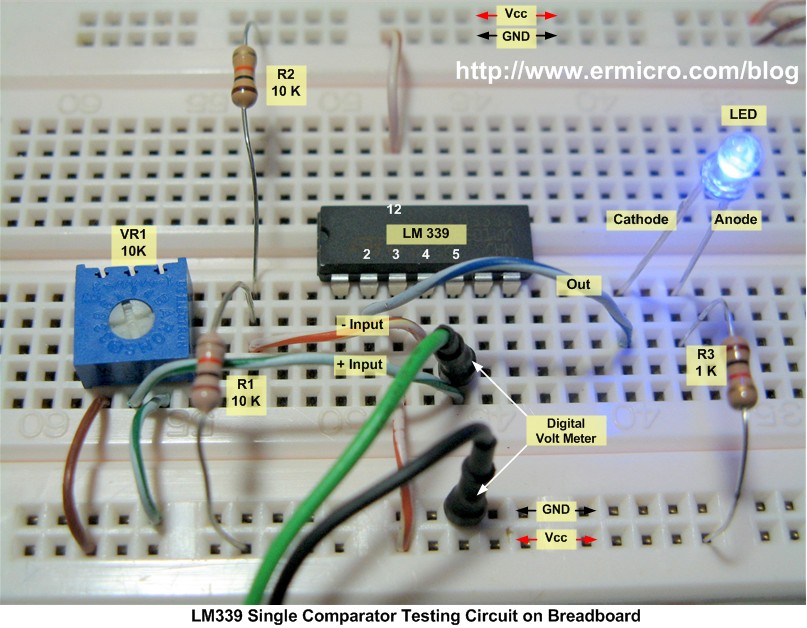
The testing circuit simply connects the comparator inverting input to the voltage divider R1 and R2, with 5 Volt voltage supply the V- could be calculated as follow:
V- = (R2 / (R1 + R2)) x Vcc
V- = (10 / 20) x 5 volt = 2.5 volt
For more information about the voltage divider circuit please refer to my previous posted blog Basic Resistor Circuit.
The comparator non-inverting input is connected to the 10 K trimport which is also forming the voltage divider circuit where we could adjust the V+ voltage start from 5 volt down to 0 volt. First when the V+ is equal to Vcc (5 volt) the comparator output will swing to the logical high (Vout = Vcc) because the V+ is greater than V- (2.5 volt). This will switch the Q8 transistor OFF and the LED will turn OFF. When the voltage V+ drop bellow 2.5 volt, the comparator output will swing to the logical low (Vout = GND) and this will switch the Q8 transistor ON and the LED will turn ON.
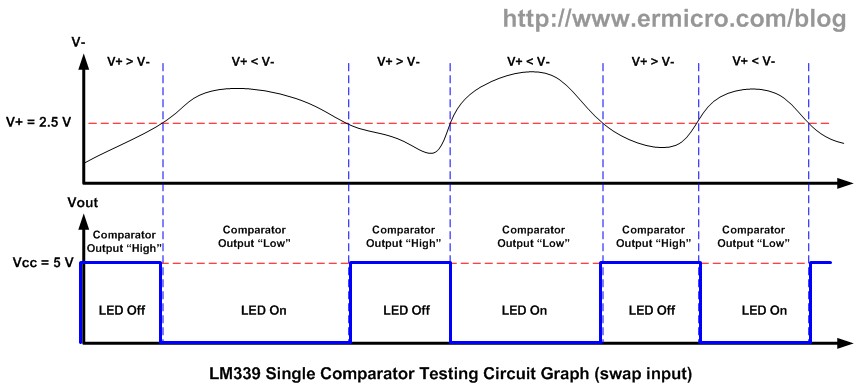
By swapping the analog input; the R1 and R2 voltage divider connected to the non-inverting input (V+) and the trimport connected to the inverting input (V-) we will get the opposite output result.
Again using the voltage divider principal the voltage on the non-inverting input (V+) is about 2.5 volt, therefore if we start the inverting input voltage (V-) at 5 volt; the V+ is lower than the V-, this will make the comparator output will swing to the logical low (the Q8 transistor ON) and the LED will turn ON. When we adjust the V- down bellow the 2.5 volt (V+) than the comparator output will swing to the logical high (the Q8 transistor OFF) because the V+ now is greater than V- and the LED will turn OFF. You could see all of this experiment on the video at the end of this tutorial.
As you’ve seen from the experiment above, the comparator is usually used to compare one variable analog signal with predetermined analog signal or we could call it as the reference voltage. Therefore by placing the reference voltage to the inverting or non-inverting input we could manage the comparator output accordance to our need. This comparator circuit is also known as the zero crossing detector circuit.
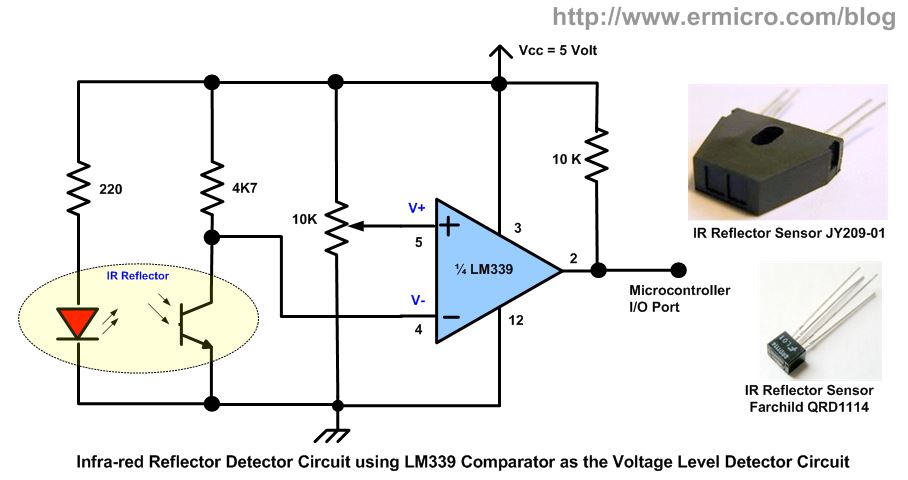
The following schema show you how we utilized the zero crossing detector circuit in the infra-red reflective detector usually found in many robotics projects.
When the infra-red LED beam reflected back to the photo transistor, the photo transistor will turn ON; this will make the reference voltage (V+) become greater than the input voltage (V-). This condition will make the comparator give a logical high to the microcontroller I/O port. When the infra-red LED beam is blocked, the photo transistor will turn OFF; this will make the input voltage (V-) become greater than the reference voltage (V+) and the comparator will give a logical low to the microcontroller I/O port.
Hmm, by applying the circuit schema above to all the comparators in the LM339 package (four comparators), we could make a very sensitive infrared reflector sensors for sensing the black/white line used in many line follower or line maze solver robot.
2. Comparator with the Positive Feedback
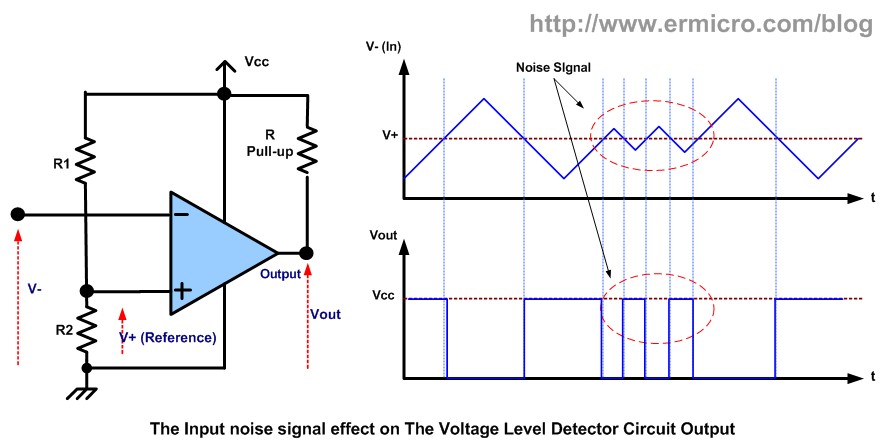
One of the drawbacks with the zero crossing detector on the circuit above is; it’s very sensitive to the noise signal (small interference signal) on its input as shown on this following picture:
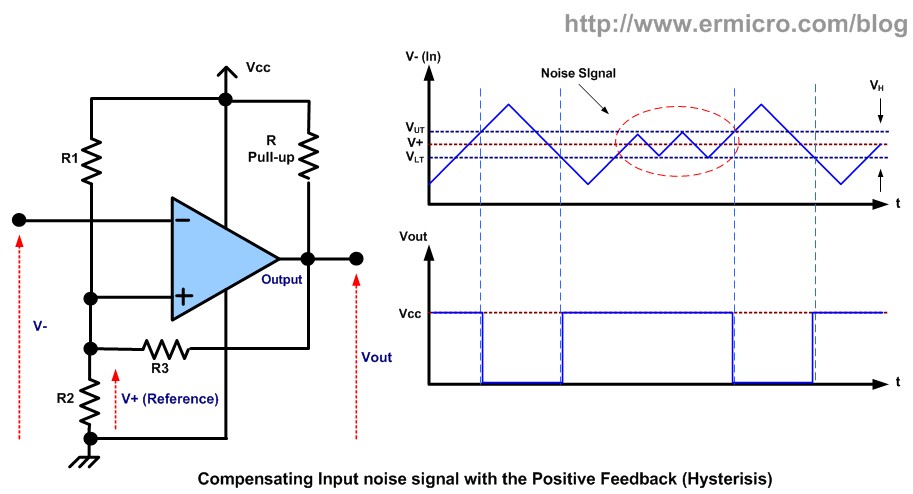
Because the comparator basically is an uncompensated high gain operational amplifier, therefore this could make the comparator to start oscillate or continuously giving high and low output. To compensate this behavior we could apply a small amount of voltage feedback to the non-inverting input as shown on this following schema:
To analyze this circuit first we assume the output voltage is high; in order to meet this condition theV- (inverting input) voltage should be lower than the V+ (non-inverting input) voltage. When the V-voltage increases toward the V+ voltage, this will drive the Vout toward ground which will also shift the V+ voltage through the R3 resistor. Because the V+ is the non-inverting input to the comparator; this feedback will help to drive down the Vout to ground even faster. The opposite condition also occur when the V- voltage decrease, because of the R3 resistor feedback on the V+input; this feedback will shift the V+ voltage input will ensure a faster switching result to logical high (Vcc) on the Vout.
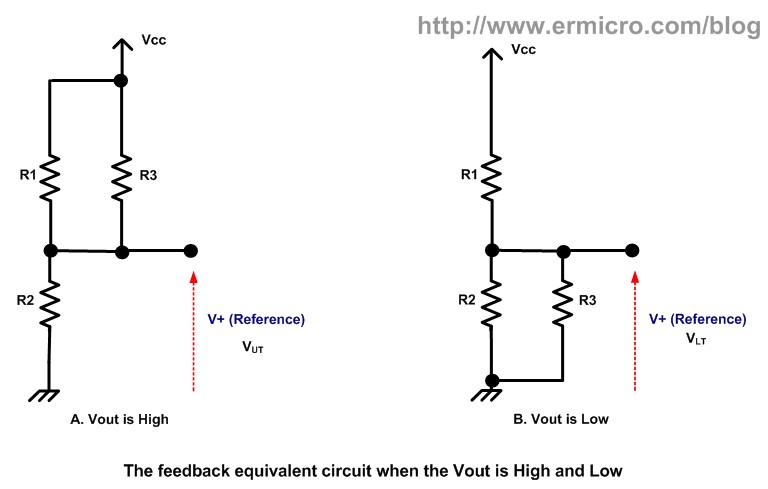
The V+ voltage upper threshold (VUT) to make the Vout voltage to swing to ground could be calculated as this following formula.
VUT = (R2 / (R2 + R1||R3)) x Vout
We assume the Vout equal to Vcc when the output is high then we could have this following formula:
VUT = (R2 / (R2 + R1||R3)) x Vcc
and
R1||R3 = (R1 x R3) / (R1 + R3).
Substituting the R1||R3 (R1 parallel R3) inside this equation we will get this following formula:
VUT = (Vcc x R2 x (R1 + R3)) / (R1 x R2 + R1 x R3 + R2 x R3).
The V+ voltage lower threshold (VLT) to make the Vout voltage to swing to high (Vcc) could be calculated as this following formula.
VLT = (R2||R3 / (R2||R3 + R1)) x Vcc
and
R2||R3 = (R2 x R3) / (R2 + R3).
Again by substituting the R2||R3 (R2 parallel R3) inside this equation we will get this following formula:
VLT = (Vcc x R2 x R3) / (R1 x R2 + R1 x R3 + R2 x R3).
The different between the upper and lower threshold voltage is called the hysteresis voltage:
VH = VUT – VLT
Therefore by applying the upper and lower threshold formula, we could get the hysteresis voltage as follow:
VH = (Vcc x R1 x R2) / (R1 x R2 + R1 x R3 + R2 x R3).
To insure that Vout will swing between Vcc and ground we have to choose:
R3 > R pull-up and R pull-up < R load
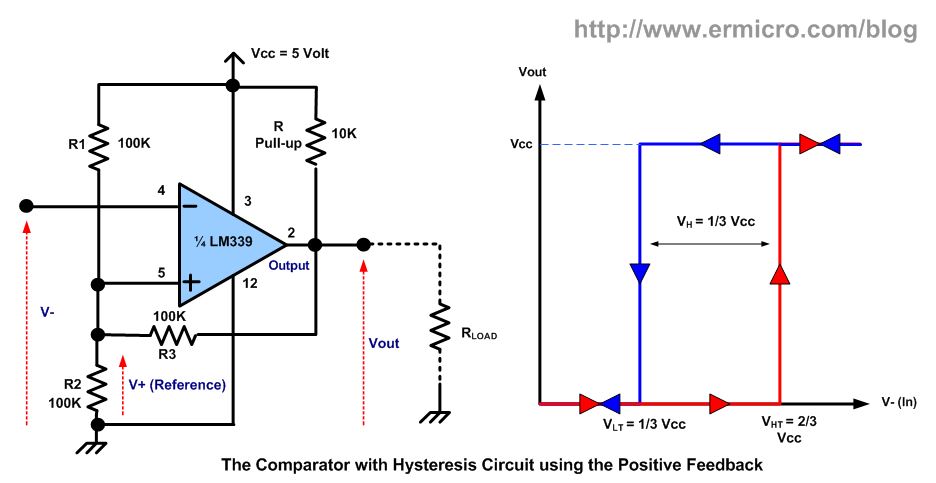
Therefore by assigning the R pull-up = 10K, R1 = R2 = R3 = 100K and using the 5 volt supply we could calculate the upper and lower threshold voltage as follow:
VUT = 2/3 Vcc and VLT = 1/3 Vcc
The different between the upper and lower threshold is called the hysteresis voltage:
VH = 1/3 Vcc
The common way to represent the hysteresis graph instead of using two graphs as shown on the above picture is by assigning the Vout on the Y axis and V- (in) on the X axis, now we could get this following picture:
Therefore by shifting the V+ voltage with the R3 feedback resistor we could compensate the comparator output to become more immune to the noise signal. This hysteresis comparator circuit also could be used as a Schmitt Trigger with the adjustable threshold point by just changing the value of R1, R2 and R3 resistors respectively.
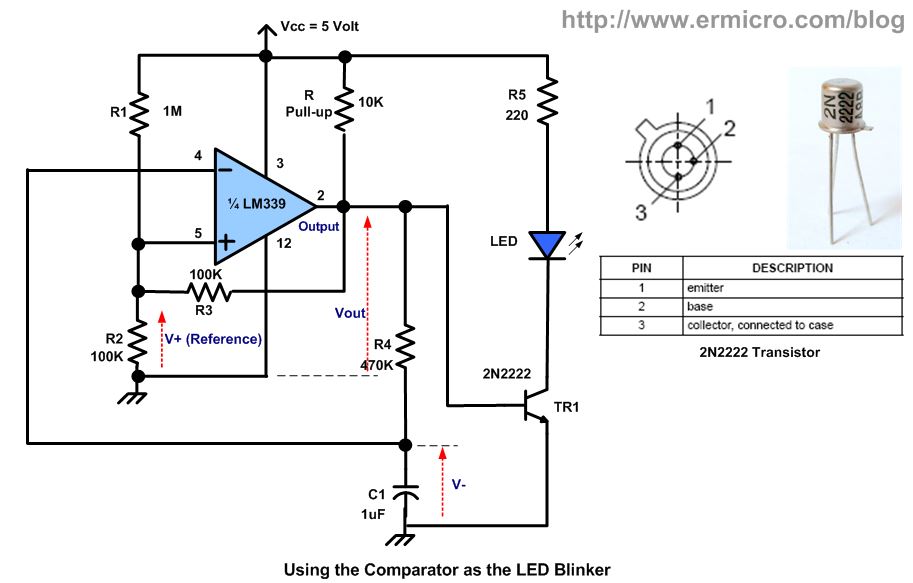
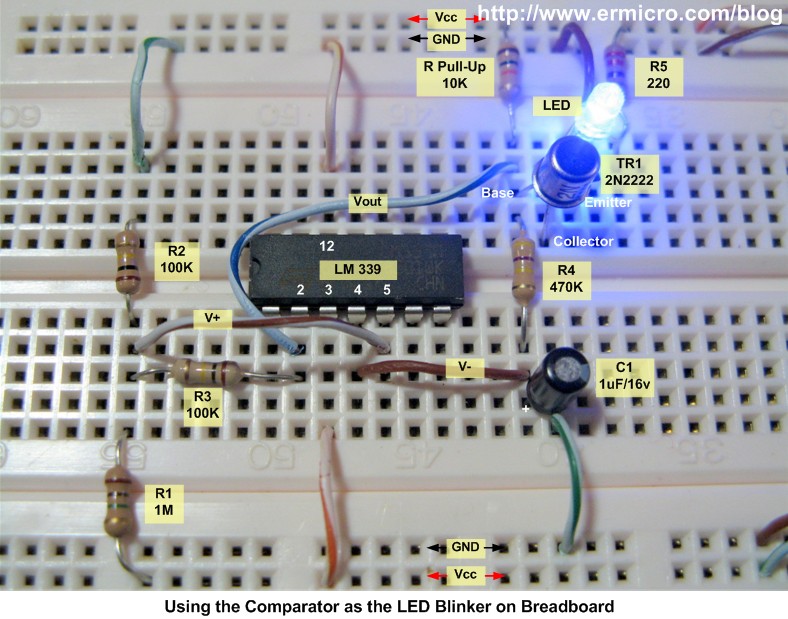
One of the interesting usages of this hysteresis behavior is to use the comparator as the pulse generator or oscillator; where you could easily make a simple LED blinker as shown on this following circuit bellow:
Again to analyze this circuit first we assume the Vout is high, this will turn on the TR1 transistor and the LED will be ON. In order to meet this condition the V- should be less than V+ (V- almost zero) or we could say that the C1 is now being charged through the R4 resistor. Now the V- will slowly increase and because of the voltage shift provided by the R3 feedback resistor on the V+ input; this will make the Vout rapidly swing to the logical low (LED OFF) and this time the C1 will discharge its energy through the R4 resistor and the V- will decrease; when it reach bellow the V+ then the process will repeat again. You could easily change the LED blink rate by changing the R4 and C1 value respectively.
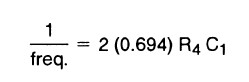
The output frequency could be calculated using this following formula (taken from AN-74: National Semiconductor Application Note 74):

Where R4 is the resistance in Ohm, C1 is the capacitance in Farad and freq. is the pulse frequency in Hertz. Therefore using this formula, we could calculate the frequency of the LED blinker circuit above as follow:
1 / Freq. = 2 (0.694) x 470000 x 0.0000001 = 0.65236
Frequency = 1 / 0.65236 = 1.53 Hertz
By using different R4 and C1 values on each comparator in the LM339 package (four comparators) you could assembly four independent LED blinker with each of them have a different blink rate. By hooking up to 4 LEDs on each 2N2222 transistor you could get a very nice random LED blink effect similar to the main computer panel shown on many sci-fi movies.
3. The Limit Window Comparator
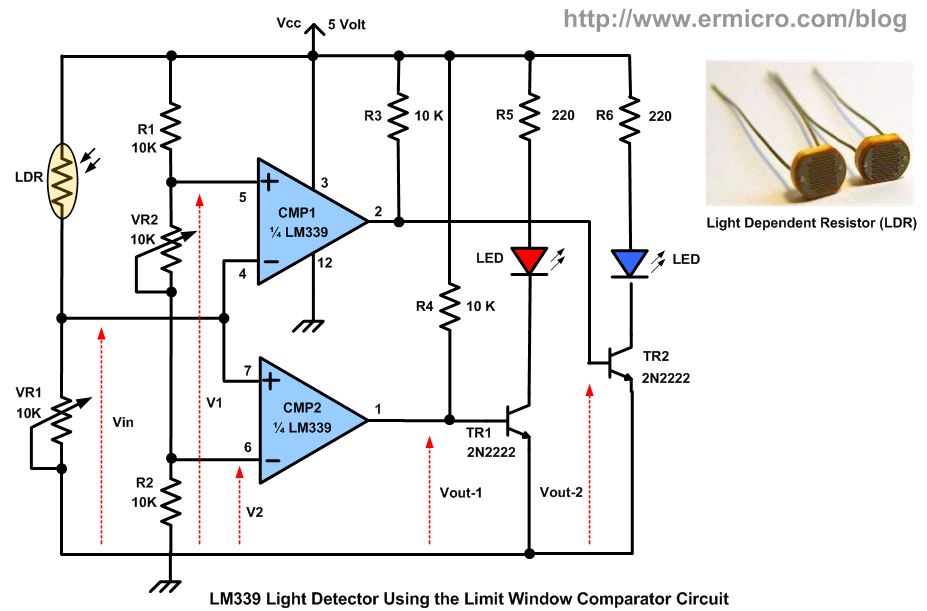
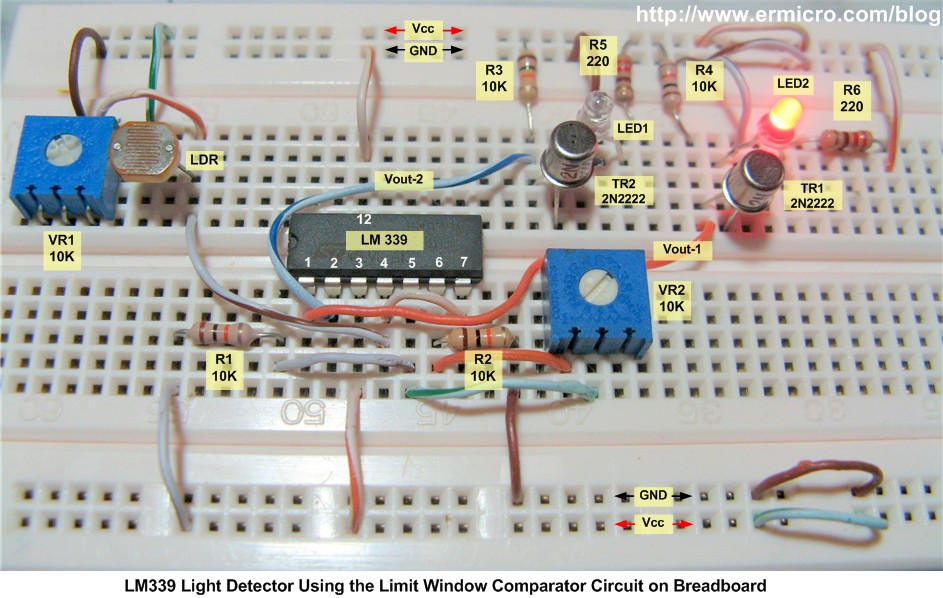
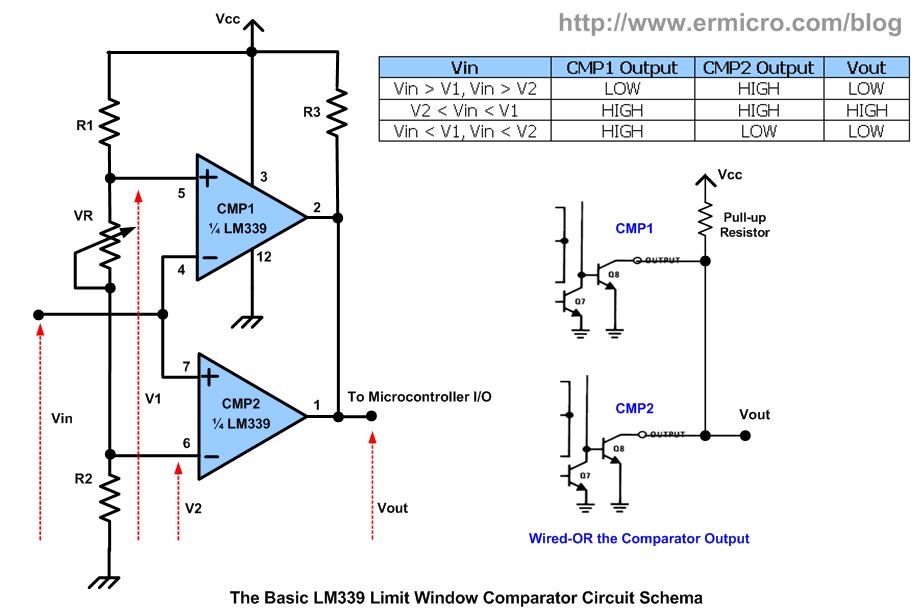
Using a single comparator we could only have one voltage reference value, if we want to have two voltage reference values; where we could set the upper and lower voltage level limit value to determine the output; we could used what is called the limit window comparator circuit or also known as dual edge limit detector circuit. On our next experiment we will build the light sensor circuit with the LDR (light dependent resistor) as the sensor and using the limit window comparator circuit. This circuit will light up the LED according to the light intensity detected by LDR. The complete example circuit is shown on this following schema:
To analyze the circuit above; first we assume that the VR2 is equal to 10K; Again the R1, VR2 and R2 will form the voltage divider circuit to both V1 and V2:
V1 = ((R2 + VR2) / (R1 + VR2 + R2)) x Vcc = 2/3 Vcc
V2 = (R2 / (R1 + VR2 + R2)) x Vcc = 1/3 Vcc
The LDR and the VR1 are also forming the voltage divider circuit on the Vin:
Vin = (VR1 / (VR1 + LDR) x Vcc
Therefore if Vin is greater than V1 and V2 (Vin > 2/3 Vcc) then the comparator CMP1 output will swing to the logical low and make the TR2 to turn OFF (LED2 OFF), while the comparator CMP2 output will swing to the logical high, this will power the TR1 base make the TR1 to turn ON (LED2 ON).
When the Vin is less then V1 but greater than V2 (1/3 Vcc < Vin < 2/3 Vcc) then the comparator CMP1 output will swing to logical high and make the TR2 to turn ON (LED2 ON). The comparator CMP2 output also will swing to the logical high, this will provide the necessary voltage input on the TR1 base to make it ON (LED1 ON).
The last when the Vin voltage goes bellow the V1 and V2 (Vin < 1/3 Vcc) then the comparator CMP1 output will swing to logical high and make the TR2 to turn ON (LED2 ON), while the comparator CMP2 output will swing to the logical low and make the TR1 to turn OFF (LED1 OFF).
Therefore by adjusting the VR1 and VR2 you could easily adjust the Vin and set the upper and lower voltage reference level limit as necessary.
By connecting both comparator open collector output (wired-OR) we could get the desired response, where the output only swing to the logical high (“1“) when Vin voltage is within the Lower and Upper limit voltage.
The limit window comparator mostly used to detect two conditions such as for the temperature sensor, when the temperature exceed the upper limit or way down below the lower limit; the limit window comparator output will send the warning or control signal to the microcontroller I/O port
4. Comparator inside the Microcontroller
On this last comparator tutorial we will take a look at the comparator circuit inside the microcontroller. Most of today’s modern microcontroller has already equipped with this feature. Usually it being used as the zero crossing detector circuit, where it takes two analog inputs and compares them; then produce the interrupt according to the voltage input level on both input.
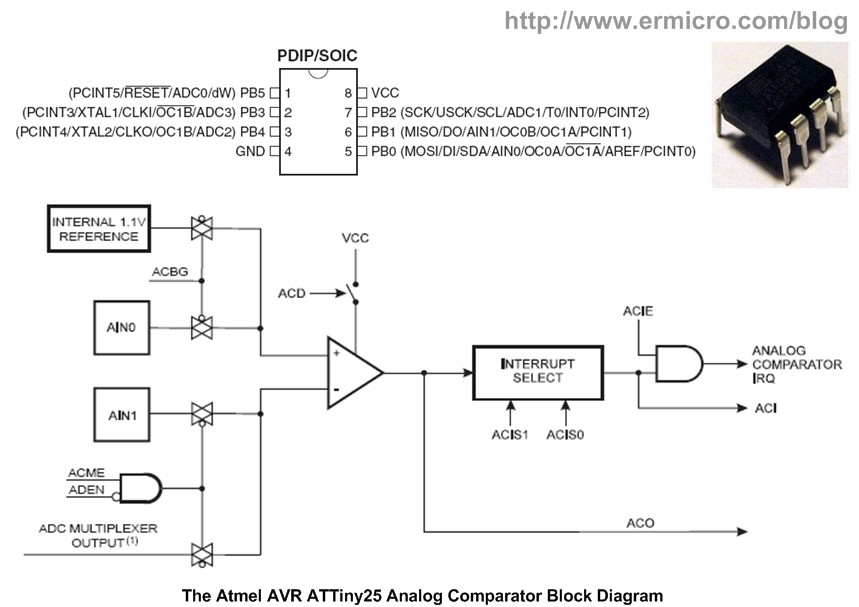
Now let’s take a look at the Atmel AVR ATTiny25 microcontroller; it’s one of the smallest and yet powerful 8-bit 8-pins AVR family microcontroller which has a build in one powerful analog comparator circuit inside.
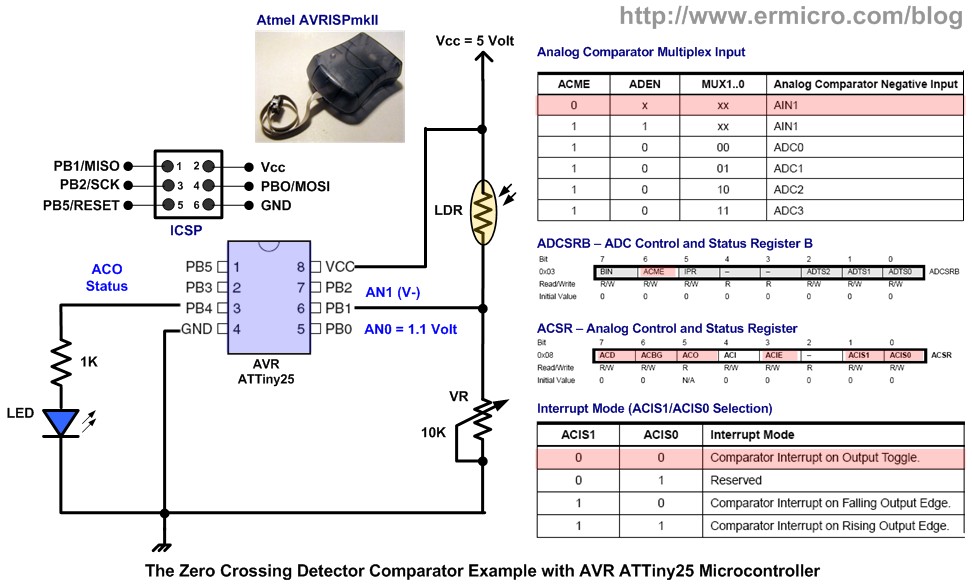
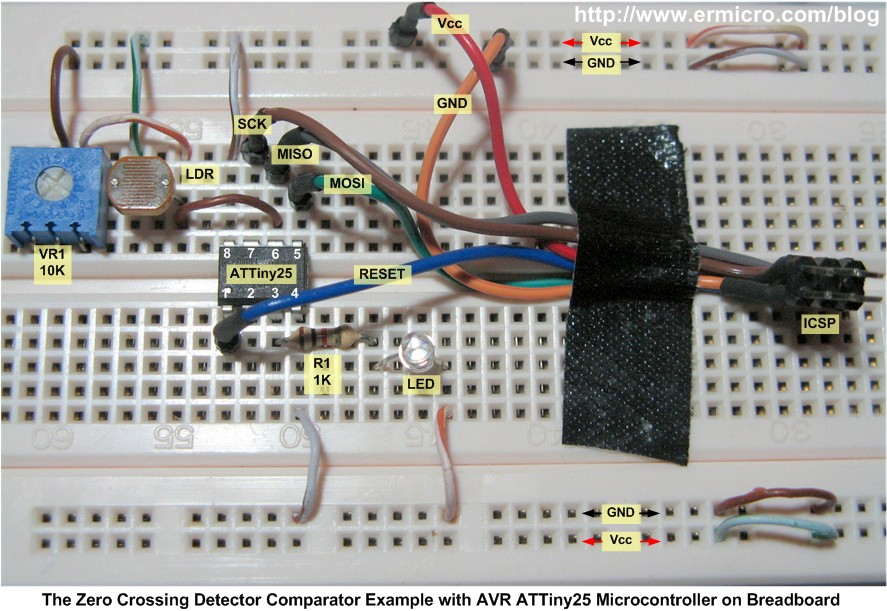
The AIN0 (PB0) could be used as the comparator’s non-inverting input and the AIN1 (PB1) could be used as the comparator inverting input. We also could choose to use the AVR ATTiny25 microcontroller internal reference voltage 1.1 volt connected to the non-inverting input. To understand how this analog comparator works, I use a simple circuit to demonstrate how we could use the microcontroller analog comparator as the zero crossing detectors. This time I will take advantage of the internal reference voltage on the non-inverting input and connect the comparator inverting input to the LDR and trimport. This following schema shows you the example of light detector using the ATTiny25 microcontroller analog comparator feature.
The following is the AVR microcontroller assembler code that demonstrates this capability:
;***************************************************************************
; File Name    : comparator.asm
; Version      : 1.0
; Description. : Zero Crossing Detector Examples
; Author       : RWB
; Target       : AVR ATTiny25
; Compiler     : AVR macro assembler 2.1.41 (build 1792)
; IDE          : Atmel AVR Studio 4.17
; Programmer   : Atmel AVRISPmkII
; Last Updated : 01 March 2010
;***************************************************************************
.include "tn25def.inc"
; Use AVR ATTiny25 Default Frequency Clock
.equ F_CPU = 8000000
.cseg
; Start on the flash ram's address 0
.org 0
        rjmp  main             ; Jump to the Main Program
.org    ACIaddr                ; 0x0007 - Analog Comparator Interrupt Vector
        rjmp  a_comp           ; Jump to Analog Comparator Interrupt Handler
; Analog Comparator Interrupt Routine Handler
a_comp: in    R0,SREG          ; Save the SREG Status
        sbic  ACSR,ACO         ; if (AC0 == 0), V- > 1.1V, Turn Off LED
        rjmp  led_on           ; else, V- < 1.1 V, Turn On LED
        cbi   PORTB,PB4        ; Turn Off LED on PB4
        rjmp  ex_int           ; Goto Exit Interrupt
led_on: sbi   PORTB,PB4        ; Turn On LED on PB4
ex_int: out   SREG,R0          ; Restore the SREG Status
        reti                   ; Return from Interrupt Handler
; Start the Main Program
main:   ldi   R24,RAMEND       ; Initial Stack Pointer
        out   SPL,R24          ; SP = RAMEND
; Initial the I/O Used
        ldi   R16,0b00010000   ; Set PB4=Output, PB0,PB1,PB2,PB3,PB5 and PB6 as Input
        out   DDRB,R16         ; DDRB=0x10
; Initial the Analog Comparator
        cbi   ADCSRB,ACME      ; Disable Multiplex Inverting input, just use AN1 (PB1)
        cbi   ACSR,ACD         ; Enable Analog Comparator
        sbi   ACSR,ACBG        ; Use 1.1V (Band Gap) Internal Reference on AN0-Non Inverting Input
        cbi   ACSR,ACIS1       ; Use Interrupt Output Toggle
        cbi   ACSR,ACIS0
        ldi   R16,0b00000011   ; Disable Digital Input on AN0 (PB0) and AN1 (PB1)
        out   DIDR0,R16
        sbi   ACSR,ACIE        ; Enable Analog Comparator Interrupt
        sei                    ; Enable Global Interrupt
loop:   rjmp  loop             ; Loop Forever and Let the Interrupt do the work
.exit
; EOF: comparator.asm
The analog comparator inside the Atmel AVR ATTiny25 microcontroller is capable to use multiplex inverting analog input from ADC0, ADC1, ADC2 and ADC3, but on this tutorial I will use the AN1(PB1) as the inverting input which connected to the LDR and 10 K trimport voltage divider circuit. By clearing the ACME (Analog Comparator Multiplex Enable) bit on the ADCSRB register, we simply disable this feature.
The non-inverting input is designed to use the 1.1 volt internal reference voltage by enabling the analog comparator band gap (ACBG) bit on the ACSR register. By enabling the analog comparator interrupt (ACIE) bit on the ACSR register, we could instruct the AVR ATTiny25 microcontroller to generate interrupt on every output toggle by clearing the ACIS1 and ACIS0 bits on the ACSRregister. Therefore by examining the analog comparator output (ACO) bit on the ACSR register we could easily determine whether the V- inverting voltage (AN1) is less or greater than the V+ (AN0) inverting voltage and use this information to toggle the PB4 output port to make the LED ON and OFF. You could read more about programming the AVR assembler code on my previous posted blogBeginners AVR Assembler Language Programming 1
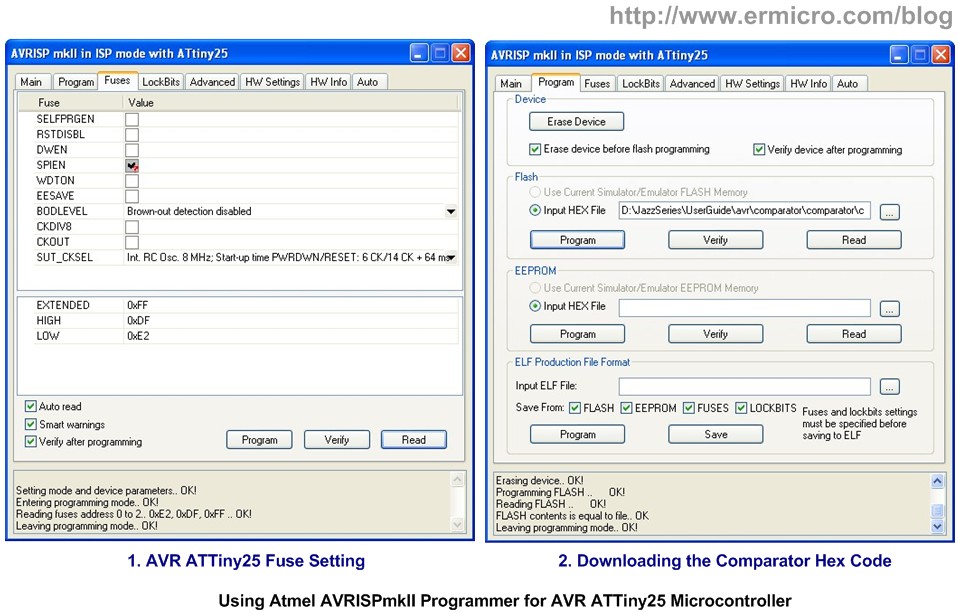
Using the powerful Atmel AVR Studio v4.17 integrated development environment you could easily compile and debug this AVR assembler code, and then down load the hex code into the ATTiny25 microcontroller flash ram using the AVR microcontroller programmer; on this tutorial I used Atmel AVRISPmkII programmer.
Now you could enjoy this following video which showing all the experiments we’ve already done on this tutorial
The Final Thought
The comparator or op-amps in general is one of the breakthroughs in the integrated circuit development as this tiny smart circuit has tremendous applications in electronics industries. Therefore understanding of how the comparator work will help you take the advantage of this amazing circuit in your next electronics or embedded system project.

Bookmarks and Share

MIT App Inventor 2 Beta For Android Exercise GoogleMap

MIT App Inventor 2 Beta For Android Exercise GoogleMap

參考
http://s810802.pixnet.net/blog/post/47679382-%E3%80%90mit-app-inventor-%E5%85%A5%E9%96%80%E7%AF%84%E4%BE%8B%E3%80%91ex4.map-tour%E6%99%AF%E9%BB%9E%E4%BB%8B%E7%B4%B9

https://sites.google.com/a/appinventor.tw/appinvetor/share/whereami


Node-Red --> MQTT --> Fuxa

Node-Red --> MQTT --> Fuxa      FUXA(一個開源的 Web HMI / SCADA 自動化監控軟體)的專案設定檔 。 這份設定檔完整定義了 HMI 監控畫面的 後端通訊(MQTT 連線、點位標籤) 與 前端網頁圖形介面(SVG 畫布...